



If you’ve ever wondered how a website actually appears on your screen, there’s a whole system working behind the scenes to make it happen. You type a domain name into your browser, hit Enter, and a few seconds later the website loads with its images, text, videos, and other content. It can feel almost instant, but the website has to be stored somewhere first and delivered to your device when you request it. That’s where web hosting comes into the picture.
So, what is web hosting? In simple terms, web hosting is a service that provides the server space and resources needed to store a website and make it accessible on the internet. Your website’s files, images, databases, and other data need to live on a server that can communicate with visitors’ browsers. A hosting provider operates and maintains those servers, allowing people to access your website whenever they enter its address.
Web hosting is often mentioned alongside domain names, but the two are not the same thing. A domain is the address people use to find your website, while hosting is the place where the website itself lives. You can think of the domain as the address of a house and web hosting as the house where everything is actually stored. Both work together, but they perform completely different jobs.
Once you understand that basic relationship, web hosting becomes much easier to make sense of. There are different types of hosting, different levels of server resources, and different ways hosting companies manage their infrastructure, so not every hosting plan works the same way. The right choice can depend on the type of website you are building, how much traffic you expect, and how much control or technical management you need. Before comparing those options, though, it helps to understand exactly what happens between the moment someone enters a website address and the moment that website appears on their screen.
What is Web Hosting
Web hosting is a service that gives your website a place to live on the internet. A website is made up of different things, including HTML, CSS, JavaScript, images, videos, databases, and other files, and those files need to be stored on a computer that is connected to the internet and capable of responding when someone visits the site. That computer is generally called a web server, while the company providing the infrastructure and service is called a web hosting provider. WordPress.org similarly describes a hosting provider as a company or organization that provides the infrastructure needed to make information accessible through the web.
A simple way to picture web hosting is to imagine that your website is a house. The website itself is the house, the hosting server is the land where the house sits, and the domain name is the street address people use to find it. You can build a beautiful house, but it still needs somewhere to exist; in the same way, you can create all the pages and content for a website, but those files need to be stored somewhere that visitors can reach. WordPress’s own learning materials use essentially the same house-and-address analogy to explain the relationship between hosting and domains.
The important thing to understand is that web hosting is not the same thing as a domain name. A domain is the human-readable address, such as example.com, while hosting provides the server where the website’s files and data are stored. When someone types a domain into a browser, the browser needs to find out which server is associated with that domain before it can request the website. DNS, or the Domain Name System, handles this translation by mapping a domain name to an IP address that computers can use to locate the relevant server.

You can visualize that relationship like this:
Domain name → example.com
↓
DNS → finds the server’s IP address
↓
Web hosting server → stores the website’s files and data
↓
Web server software → processes the request
↓
Browser → displays the website
This happens whenever someone visits your website, although the actual process involves several networking steps that happen very quickly. The browser first needs to resolve the domain, establish a connection with the server, send a request for the requested resource, and receive a response. The server can then return things such as HTML, CSS, JavaScript, images, and other resources that the browser uses to construct the page you see.
For example, imagine someone types example.com/about into their browser. The browser doesn’t simply ask the internet for something called “example.com” and magically receive a webpage. It first needs to determine where example.com is hosted, which involves a DNS lookup. Once the appropriate server is identified, the browser sends a request for the /about page, and the server processes that request and sends the necessary files or generated response back to the browser.
What happens on the server depends on the type of website you are visiting. A simple static website might mainly consist of files such as HTML, CSS, JavaScript, and images that the server can deliver directly. A WordPress website works differently because WordPress uses PHP and a database to manage dynamic content. When someone requests a WordPress page, the server can process the WordPress software, retrieve the relevant information from the database, generate the page, and send the resulting content to the visitor’s browser.
This is why a hosting server is more than just a giant hard drive connected to the internet. The server provides computing resources that allow websites and web applications to actually run. Depending on the hosting environment, those resources can include CPU processing, memory, storage, database services, networking, web server software, PHP, and other technologies required by the website. WordPress.org notes that hosting environments can involve technologies such as web server software, FTP, PHP, MySQL or MariaDB, and operating system software.
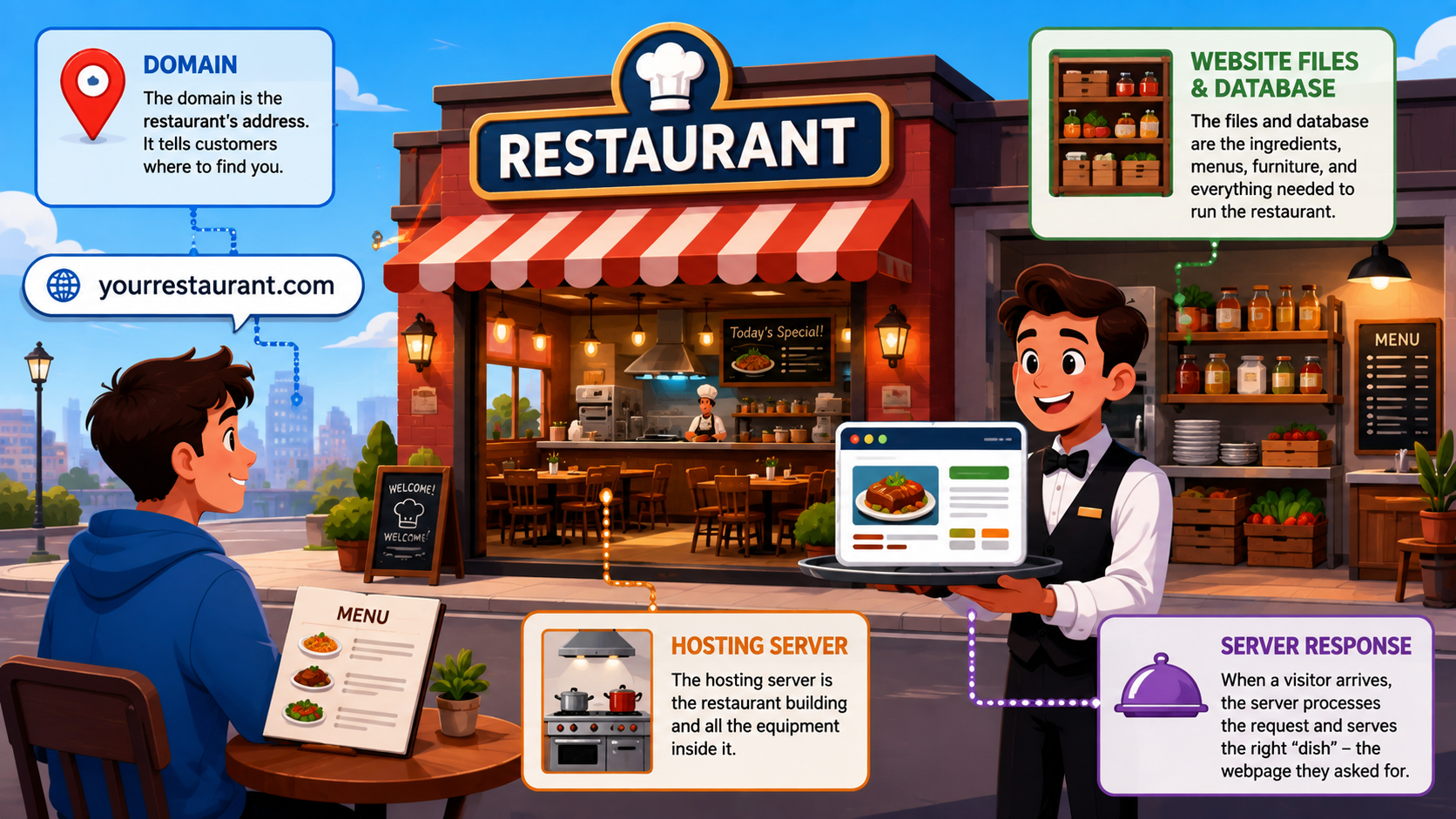
Another way to picture this is to think of a restaurant. Your domain is the restaurant’s address, telling customers where to find it. The hosting server is the physical restaurant space and the equipment inside it, while your website files and database are the ingredients, menus, furniture, and other things needed to operate the restaurant. When a visitor arrives, the server processes their request and provides the appropriate “dish” – in this case, the webpage that their browser requested.
The server also needs to be connected to the internet and configured to accept requests from visitors. Web servers use software designed to receive requests and serve website content, with technologies such as Apache and other web server software commonly used for this purpose. A hosting provider takes care of the underlying infrastructure needed to keep these servers connected and available, which is one of the main reasons most website owners use a hosting company rather than trying to operate their own server from a home computer.
Hosting is also closely connected to website availability. If the server hosting your website is unavailable, visitors may not be able to load the site even if your domain name and website files are perfectly fine. This is why factors such as server reliability, network connectivity, maintenance, resource availability, and infrastructure matter when choosing where to host a website. The website needs more than storage; it needs an environment capable of delivering its content consistently when people request it.
Security is another part of the hosting environment. A website communicates with visitors through the internet, so the connection and the server need appropriate security measures. HTTPS, for example, uses TLS encryption to establish a secure connection between the visitor’s browser and the server. Hosting providers and other services may provide SSL/TLS certificates as part of the infrastructure used to secure websites.
Hosting can also interact with other services that sit between the visitor and the origin server. A CDN, for example, can cache certain website resources on servers distributed across different geographic locations so that visitors can receive those resources from a location closer to them. However, a CDN is not a replacement for web hosting; it works alongside hosting by helping deliver cached content more efficiently.
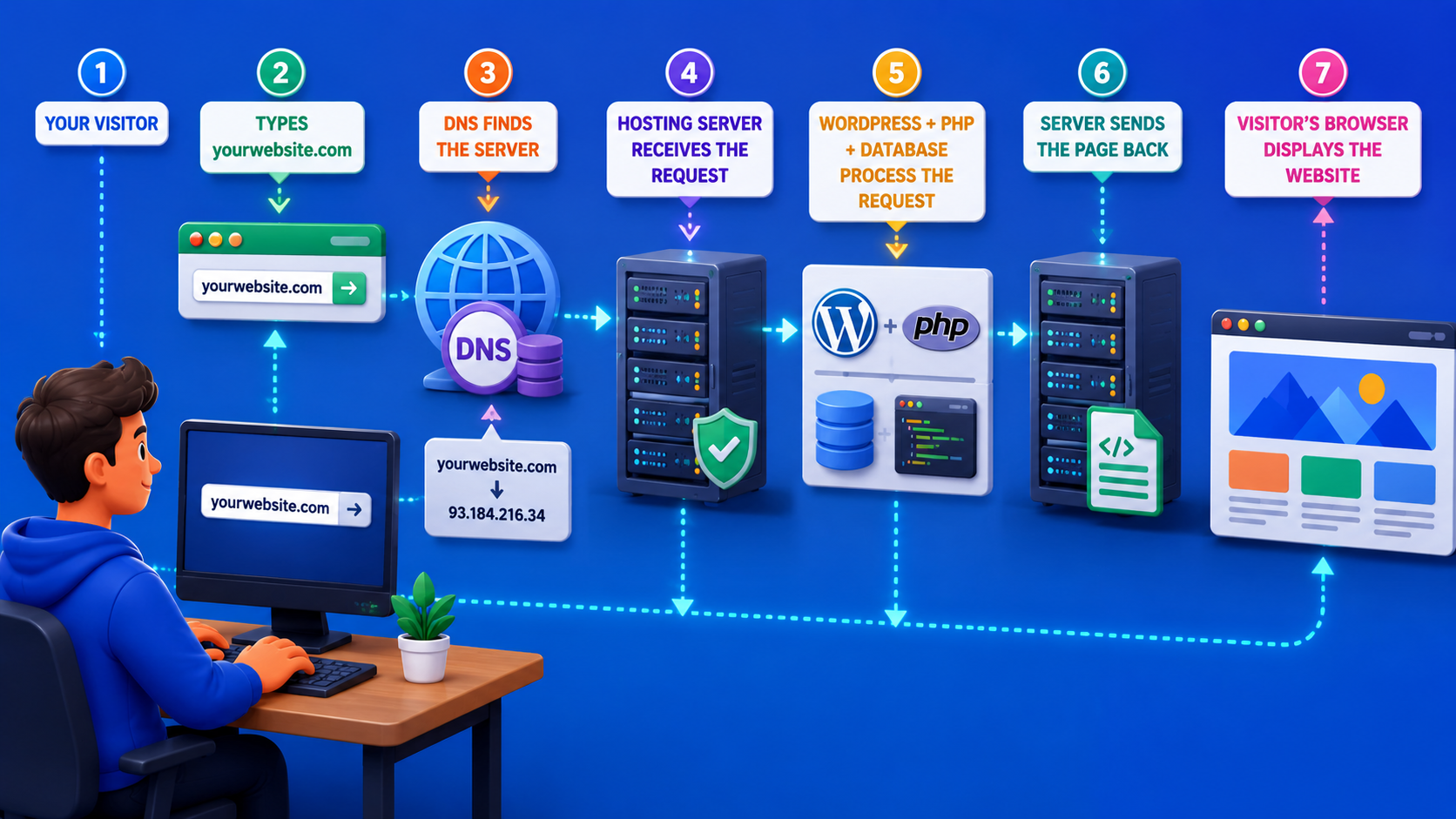
For a WordPress website, the relationship becomes particularly easy to see. WordPress is the software used to create and manage the website, while hosting provides the environment where that software runs. Your domain gives visitors an address to reach the site, the hosting server stores the WordPress files and database, and the web server processes requests so the resulting pages can be delivered to visitors. This is why WordPress.org and web hosting are closely connected: downloading WordPress from WordPress.org gives you the software, but you still need a server to run it if you are using self-hosted WordPress.
A typical WordPress setup can therefore be pictured as:
Your visitor
↓
Types yourwebsite.com
↓
DNS finds the server
↓
Hosting server receives the request
↓
WordPress + PHP + database process the request
↓
Server sends the page back
↓
Visitor’s browser displays the website
The hosting provider sits behind much of this process. It provides the physical or cloud-based infrastructure, network connectivity, storage, and server environment needed for the website to remain accessible. Depending on the service, the provider may also offer tools for managing domains, databases, email, backups, security, SSL certificates, server resources, and other parts of the website environment. These additional services are separate from the basic concept of hosting itself, but they are commonly bundled into a hosting account.
This is also why moving a website from one host to another does not necessarily mean changing its domain name. Your domain can remain the same while the website’s files and database are moved to a different server. The DNS configuration can then be updated so that the domain points to the new hosting environment. From the visitor’s perspective, the website can continue using the same address even though the server where the website lives has changed.
Types of Web Hosting
Not every website needs the same amount of server resources or the same level of control, which is why hosting companies offer several different types of web hosting. A small personal blog, for example, has very different requirements from a busy online store or a large website with thousands of visitors at the same time. The hosting environment you choose can affect your website’s performance, scalability, security, and how much technical work you need to handle.
The main differences between hosting types usually come down to how server resources are allocated and managed. Some hosting options place multiple websites on the same server, while others give a website more dedicated resources or use a network of servers to handle traffic. There are also hosting services where the provider takes care of more of the technical management, making them easier for people who don’t want to deal with server administration.
Understanding these differences is important before choosing a hosting plan because the cheapest option is not automatically the best one, and the most powerful option may be unnecessary for a small website. The right choice depends on factors such as your website’s size, expected traffic, performance requirements, budget, and technical experience. The following types of web hosting represent the most common options you’ll encounter when looking for a place to host a website.
1. Shared Hosting
Shared hosting is one of the most common and affordable ways to host a website, especially for beginners. The basic idea is simple: multiple websites are hosted on the same physical server and share the server’s available resources. Instead of paying for an entire server for one website, you share the underlying infrastructure with other customers, which allows hosting companies to offer shared hosting at a much lower price.

A simple way to picture shared hosting is to imagine an apartment building. The server is the building, and each website is an apartment inside it. Every tenant has their own private space, but everyone shares parts of the building, such as the electricity, water supply, elevators, and other infrastructure. In the same way, websites on a shared hosting server have their own accounts and files, while sharing resources such as CPU, RAM, storage, and network capacity.
When you purchase a shared hosting plan, you normally receive an account with a certain amount of storage and other resources. Your hosting provider manages the physical server and the underlying infrastructure, while you manage your own website through a hosting control panel or similar interface. Depending on the provider, the plan may also include features such as a free SSL certificate, email accounts, automated backups, database management, a domain, website migration, and one-click application installation.
The important part is that the server’s hardware is shared. Imagine several websites receiving visitors at the same time. One site might receive only a few visitors, while another suddenly gets a large spike in traffic. Both websites are using the same physical machine, so the activity of one account can potentially affect the resources available to other accounts, depending on how the hosting provider manages resource limits and isolation. Modern shared hosting providers use different technologies and resource controls to reduce this problem, but the fundamental idea remains that you are not the only customer using the server.
This shared environment is one of the main reasons shared hosting is inexpensive. The hosting company can place many customers on the same physical infrastructure and divide the operating costs among them. You don’t have to pay for an entire server when your website only needs a small portion of its available capacity. For a new blog, portfolio, personal website, or small business site, this can be a practical way to get online without making hosting one of the biggest expenses of the project.
Shared hosting is also generally designed to be easy to manage. You typically don’t need to configure the operating system, install web server software manually, or manage the physical machine yourself. The hosting provider handles the server infrastructure, while you use the tools provided by the hosting account to manage your website. This makes shared hosting particularly attractive to people who want to focus on publishing content or running a business rather than learning server administration.
For example, imagine that you want to launch a WordPress blog about travel. You don’t expect thousands of people to visit the site at the same time, and most of your requirements are fairly simple: WordPress, a theme, several plugins, some image storage, an SSL certificate, and a domain. You probably don’t need an entire server dedicated to that website. A shared hosting plan can provide enough resources for the site while keeping the initial hosting cost relatively low.
The same can apply to a small business website. If a local business needs a website with pages for its services, contact information, opening hours, a few images, and perhaps a contact form, the server requirements are usually modest. Shared hosting can provide the environment needed to run the site without requiring the business owner to manage a more complicated infrastructure.
One of the biggest limitations of shared hosting is the amount of control you have over the server environment. Because the physical server is shared among multiple customers, hosting companies generally control many server-level settings. You may have access to configuration options relevant to your website, but you typically cannot treat the server as if it were your own private machine. This is one of the trade-offs for getting a managed and relatively inexpensive hosting environment.
Resource limits are another important consideration. A shared hosting plan may advertise a certain amount of storage or bandwidth, but the provider may also impose limits on CPU usage, RAM, concurrent processes, database resources, or other aspects of server usage. These limits help prevent one customer from consuming an unreasonable amount of the shared server’s capacity. The exact limits vary considerably between hosting companies, so looking only at storage or bandwidth can give you an incomplete picture of what a plan can actually handle.
This matters most when a website begins to grow. A small site may run perfectly well for months or even years on shared hosting, but increasing traffic, larger databases, resource-heavy plugins, or more complex applications can eventually require additional resources. If your website starts consistently reaching the limits of the hosting account, you may experience slower response times, resource warnings, or restrictions imposed by the hosting provider. At that point, upgrading the plan or moving to a different hosting environment may become necessary.
Traffic spikes are another situation where shared hosting can be tested. Imagine that your website normally receives a few hundred visitors per day, but one of your articles suddenly becomes popular and receives a large amount of traffic from social media. The website may handle the increase perfectly well if enough resources are available, but a sudden surge can also push a shared hosting account toward its resource limits. How well the site handles the spike depends on the hosting provider, the plan, the website’s optimization, and how much capacity is available on the server.
The quality of the hosting provider therefore matters more than the word “shared” alone might suggest. Two shared hosting plans can have very different real-world performance. One provider may use modern hardware, strong resource isolation, efficient caching, and a well-managed server environment, while another may place too many accounts on the same machine or provide weaker infrastructure. This is why shared hosting should not be judged only by its monthly price.
Security is another area worth understanding. A reputable hosting provider should isolate customer accounts and implement security controls to prevent one website from directly accessing another customer’s files or resources. However, sharing physical infrastructure means that you still depend on the provider’s server security and isolation practices. At the website level, you are also responsible for keeping your own WordPress installation, themes, plugins, and accounts secure.
Shared hosting can also come with different levels of management depending on the provider. Some companies provide a highly managed environment with automatic updates, backups, caching, security tools, and technical support, while others provide a more basic hosting account and expect customers to handle more of the website administration themselves. This means the term “shared hosting” describes the underlying resource-sharing model, not every feature included with the hosting plan.
Another useful distinction is between hosting resources and website resources. If your WordPress website has a poorly optimized plugin, a large number of database queries, uncompressed images, or inefficient code, it may consume more server resources than a lightweight website with the same amount of traffic. Two websites with the same number of visitors can therefore have very different hosting requirements. The amount of traffic matters, but what those visitors are doing on the website matters too.
For beginners, shared hosting can therefore be a sensible starting point because it keeps the infrastructure relatively simple and affordable. You can use it to launch a WordPress website without needing to understand server administration, and many hosting companies provide tools that simplify installation and everyday management. If the website eventually outgrows the environment, you can move to a more powerful hosting solution rather than paying for resources you don’t need from the beginning.
Shared hosting is commonly used for personal blogs, portfolios, small business websites, informational websites, smaller publications, and other projects with relatively modest resource requirements. It can also work well for a new website that is still testing its audience and doesn’t yet know how much traffic it will receive. The key is to choose a provider and plan whose resource limits match the website rather than assuming that every shared hosting package offers the same capacity.
2. VPS Hosting
VPS hosting, or Virtual Private Server hosting, sits between shared hosting and having an entire physical server dedicated to one website. Instead of putting all customers into one large shared environment, a physical server is divided into several isolated virtual servers using virtualization technology. Each virtual server operates as its own environment, with its own allocated resources and operating system, even though the underlying physical machine is still shared with other VPS customers.
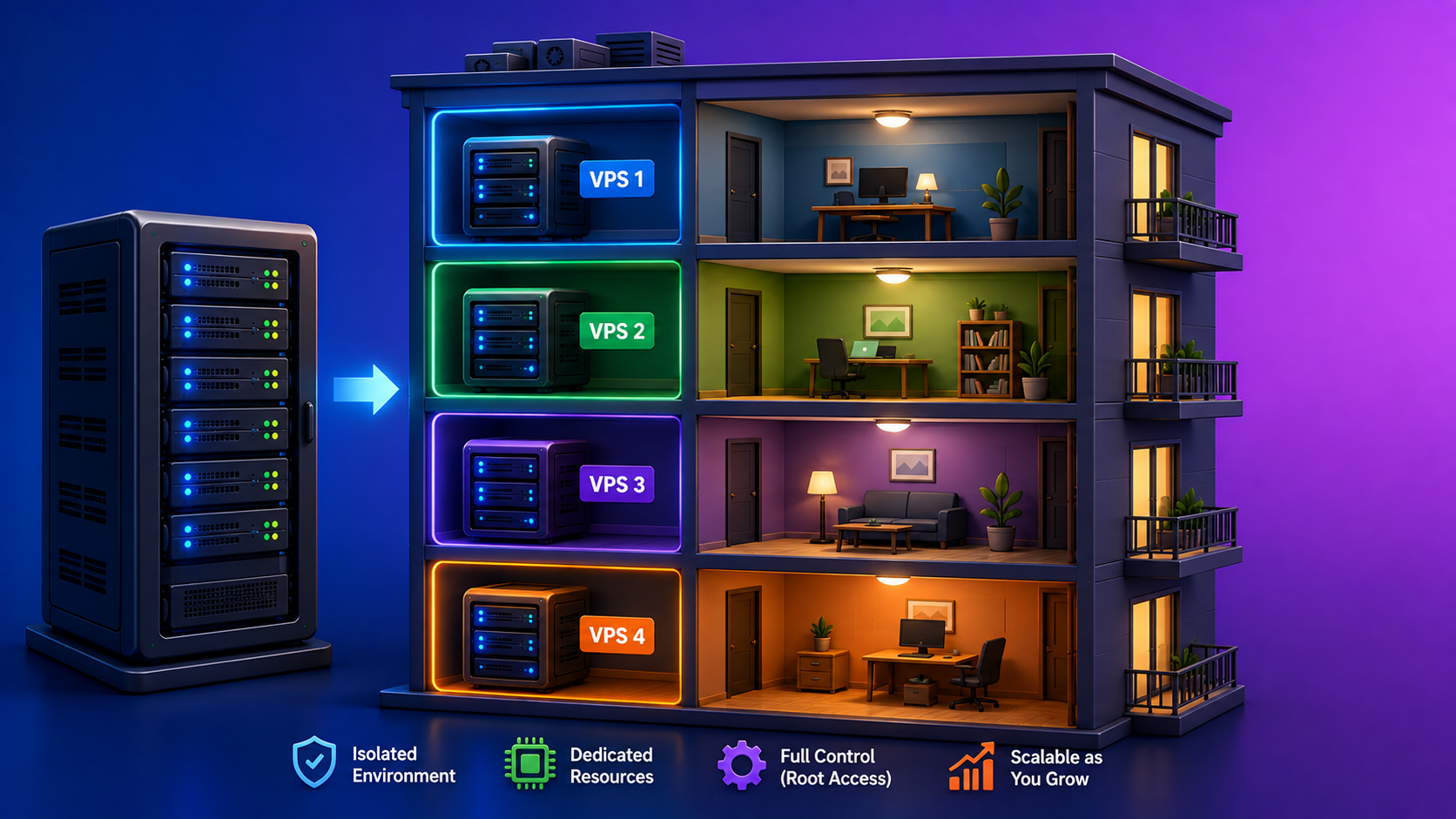
A simple way to picture VPS hosting is to imagine an apartment building again, but this time the apartments are much more independent. In shared hosting, many tenants share a building’s common resources and infrastructure, and the hosting provider decides how those resources are distributed. With a VPS, the physical server is divided into separate private apartments with clearly defined spaces and resources. You are still in the same building as other customers, but your environment is more isolated from theirs.
This distinction is what makes VPS hosting different from ordinary shared hosting. A VPS uses virtualization to create separate virtual machines on the same physical server. Each virtual machine can have its own operating system, software configuration, files, users, and allocated computing resources. A virtualization layer sits between the physical hardware and the virtual servers, allowing the physical machine to run several independent virtual environments at the same time.
Imagine a physical server as a large building with several private apartments. The building itself represents the physical server, while each apartment represents a VPS. Every apartment has its own living space, utilities, and doors, and one tenant does not normally walk into another tenant’s apartment. The tenants still share the building’s underlying structure, but each has a much greater degree of separation than people living in a conventional shared environment.
This isolation is one of the main reasons businesses and more advanced website owners choose VPS hosting. On shared hosting, several websites operate within the same hosting environment and can compete for available resources. With a VPS, a portion of the physical server’s CPU, RAM, storage, and other resources is allocated to your virtual environment. The exact resource model depends on the hosting provider, but the general idea is that your VPS has a more predictable environment than a typical shared hosting account.
For example, imagine that a physical server has enough resources to support several virtual servers. One VPS might be assigned a certain amount of RAM and CPU capacity, while another VPS receives its own allocation. If another customer on the same physical machine experiences a sudden increase in traffic, your VPS is generally more isolated from that customer’s activity than it would be in a traditional shared hosting environment. This does not mean that the physical hardware has infinite capacity, but virtualization provides stronger separation between the individual environments.
VPS hosting also gives you considerably more control over the server environment. Depending on the type of VPS and hosting provider, you may have root or administrator access, allowing you to install software, configure services, modify server settings, create users, manage applications, and customize the environment. This is a major difference from shared hosting, where the provider generally restricts access to server-level settings because the physical machine is being used by many customers.
That extra control can be useful when your website requires software that is not available in a standard shared hosting environment. For example, a developer may need to install a specific version of a programming language, configure a particular web server, run background processes, set up custom services, or use tools that require administrator access. With a VPS, these types of configurations are generally much more achievable because the customer has control over their own virtual server.
A VPS can also be configured for applications that go beyond a traditional WordPress website. You could run a web application, API, development environment, database service, automation system, or other software on a VPS, provided that the hosting provider allows it and the server has sufficient resources. This makes VPS hosting attractive to developers who need a flexible environment rather than a hosting account limited to the features supported by the provider’s shared platform.
For WordPress users, a VPS can provide a more controlled environment when a website begins to outgrow shared hosting. A growing WordPress website may have more visitors, a larger database, more plugins, more simultaneous requests, or more demanding functionality. Instead of sharing the same general environment with many other websites, the WordPress installation can run inside its own virtual server with resources allocated specifically to that VPS.
The difference can become especially noticeable during periods of increased traffic. Suppose a WordPress website normally receives a few thousand visitors per day but suddenly becomes popular because an article is shared widely or a product receives significant attention. A shared hosting account may reach its resource limits during such a spike. A properly configured VPS can provide more resources and greater control over how the server handles the additional workload.
However, having more resources does not automatically make a website fast. A VPS gives you more control over the environment, but performance still depends on how the server and website are configured. A poorly optimized WordPress installation running on a powerful VPS can still be slow, while a well-optimized website on a smaller server can perform very well. Caching, database queries, images, plugins, code, server configuration, and traffic patterns all continue to matter.
Another important characteristic of VPS hosting is scalability. As your website grows, you may be able to increase the resources assigned to your VPS without moving the entire website to a completely different physical server. Depending on the provider, you might be able to increase RAM, CPU capacity, storage, or other resources through an upgrade. This can make a VPS a useful middle ground for websites that have outgrown basic hosting but do not yet need an entire physical server.
VPS hosting can also provide more predictable resource availability than shared hosting. In a properly configured VPS environment, the resources assigned to your virtual machine are managed separately from those assigned to other virtual machines. This can reduce the effect that another customer’s website has on your own environment. However, the quality of the virtualization technology and the provider’s infrastructure still matter, so not every VPS product offers exactly the same level of performance or isolation.
There is also a significant difference between managed VPS hosting and unmanaged VPS hosting. With a managed VPS, the hosting provider may take care of tasks such as server setup, operating system updates, security configuration, monitoring, backups, and technical maintenance. The exact services vary between providers. An unmanaged VPS gives you much more responsibility, which can include configuring the operating system, installing web server software, managing security, applying updates, monitoring resources, and troubleshooting server-level problems.
This distinction is important because VPS hosting is sometimes described as if it automatically requires advanced technical knowledge. It doesn’t necessarily. A managed VPS can hide much of the server administration behind the hosting provider’s support and management services. An unmanaged VPS, however, can feel very different because you are effectively responsible for administering your own virtual server.
The additional control also means additional responsibility for security. With shared hosting, the hosting provider controls much of the server configuration. With a VPS, you may be responsible for configuring firewalls, managing user accounts, securing SSH access, updating the operating system, keeping installed software current, and monitoring suspicious activity. A misconfigured VPS can therefore create security problems even if the website software itself is secure.
Backups also need careful consideration. Some VPS providers include automated backups, while others offer them as an additional service or leave the configuration entirely to the customer. If you are managing your own VPS, you need to think about backing up both the website and the server environment. For a WordPress website, that can include the WordPress files, database, uploaded media, configuration files, and other important data.
The storage model can vary as well. Some VPS providers use SSD or NVMe storage, while others use different storage technologies. Storage capacity is important, but it is not the only factor that affects performance. The speed of the storage system, database workload, available memory, CPU capacity, and network performance can all influence how quickly a website responds.
The physical server still matters even though your website runs inside a virtual machine. Several VPS instances can exist on the same physical machine, meaning the underlying hardware is still shared at a higher level. A reputable provider needs to manage this infrastructure carefully so that the physical server has enough capacity for the virtual machines it hosts. This is sometimes referred to as avoiding excessive resource overcommitment, where too many virtual environments are placed on hardware that cannot comfortably handle their combined workloads.
VPS hosting is therefore not the same as owning an entire physical server. You have your own virtual environment, but the physical hardware underneath it can still host other customers. The major difference is that virtualization creates much stronger boundaries between those environments and gives each VPS its own operating system and allocated resources. You get many of the control benefits associated with a private server without necessarily renting an entire physical machine.
The cost reflects this difference. VPS hosting generally costs more than basic shared hosting because you are receiving more resources, greater isolation, and more control over the environment. The price can vary significantly depending on the amount of CPU, RAM, storage, bandwidth, management, backups, server location, and technical support included in the plan. A small VPS may be relatively affordable, while a high-resource managed VPS can become a significant monthly expense.
For a small personal blog that receives very little traffic, this additional cost and complexity may not be necessary. Shared hosting can often provide everything such a website needs without requiring the owner to manage a virtual server. A VPS becomes more interesting when a website has outgrown its current environment, needs more predictable resources, requires custom server configuration, or has applications that cannot run comfortably within a standard shared hosting account.
VPS hosting is particularly useful for growing business websites, higher-traffic WordPress sites, ecommerce stores, web applications, development environments, APIs, and projects that need more control over the server. It can also be a good choice for developers who want a flexible environment where they can install and configure the software their projects require.
The main trade-off is therefore straightforward: VPS hosting gives you more isolation, resources, and control than shared hosting, but it also requires more technical knowledge and usually costs more. A managed VPS can reduce the administrative burden, while an unmanaged VPS gives you greater responsibility over the server itself. The right setup depends not only on how much traffic your website receives, but also on how much control and technical flexibility the project requires.
3. WordPress Hosting
WordPress hosting is a hosting service designed to run websites built with WordPress. At the most basic level, it still provides the same fundamental things as other web hosting services: a server, storage, computing resources, network connectivity, and the software environment needed to deliver a website to visitors. The difference is that the hosting environment is configured with WordPress in mind, so certain features may be optimized specifically for WordPress websites.
The term WordPress hosting can be slightly confusing because it does not always describe one specific type of server technology. In many cases, it simply means that a hosting provider has configured its hosting environment to work particularly well with WordPress. A WordPress hosting plan can run on shared infrastructure, a virtual server, or other types of infrastructure. What makes it “WordPress hosting” is primarily the way the service is configured, managed, and marketed for WordPress users.
There are two broad approaches you will commonly encounter. The first is managed WordPress hosting, where the hosting provider takes care of a significant portion of the technical work associated with running WordPress. The second is hosting that is optimized for WordPress but can also be used to run other types of websites and applications. These two approaches can look similar on the surface, but the amount of control and management provided by the hosting company can be quite different.
With managed WordPress hosting, the provider takes a more active role in maintaining the WordPress environment. Depending on the company and plan, this can include automatic WordPress updates, server-level caching, security monitoring, backups, performance optimization, staging environments, WordPress-specific support, and other maintenance features. The exact features are not standardized, so “managed WordPress hosting” does not mean that every provider manages exactly the same things.
A simple way to picture managed WordPress hosting is to imagine renting a fully serviced apartment. You still have your own space and can arrange your website however you want within the rules of the service, but the building management takes care of many of the things happening behind the scenes. You don’t have to worry as much about maintaining the underlying infrastructure because the hosting provider handles a larger portion of the technical environment for you.
For example, a managed WordPress hosting provider may automatically update the WordPress core when a new version becomes available. Some providers may also test updates or provide tools that allow you to restore the website if an update causes a problem. The exact implementation varies, but the goal is to reduce the amount of routine server and WordPress maintenance that the website owner has to perform manually.
Managed WordPress hosting can also include WordPress-specific performance optimization. The hosting environment may be configured with server-level caching, optimized PHP settings, database improvements, object caching, or other technologies designed to help WordPress pages load efficiently. Because these optimizations are handled at the hosting level, you may not need to configure every performance feature yourself.
Security is another area where managed WordPress hosting can provide additional convenience. Depending on the provider, the service may include features such as malware scanning, firewall protection, automated updates, login protection, vulnerability monitoring, or other security measures. These services do not mean that the website owner can completely ignore security, but they can reduce the amount of technical security work that needs to be handled manually.
Managed WordPress hosting can also provide WordPress-focused support. Instead of receiving only general server support, customers may be able to contact support staff who understand common WordPress problems, such as plugin conflicts, theme issues, PHP compatibility, database problems, caching behavior, or WordPress configuration. The depth of this support varies, so it is important to check what a provider actually means when it advertises “WordPress support.”
Another feature commonly associated with managed WordPress hosting is a staging environment. A staging site is essentially a separate copy of your website where you can test changes before applying them to the live version. You might use it to test a new theme, plugin update, WordPress version, or custom code. This can be particularly useful for business websites where breaking the live site could affect visitors or customers.
Managed WordPress hosting is therefore particularly attractive to people who want to use WordPress without spending too much time dealing with the underlying technical environment. A blogger may want to focus on publishing articles, while a business owner may want to focus on customers and services rather than server configuration. Developers can also use managed hosting when they want reliable infrastructure without having to maintain every server component themselves.
However, WordPress hosting does not always mean managed WordPress hosting. Many hosting companies offer plans that are marketed specifically for WordPress but still give customers relatively broad control over the hosting environment. In this situation, WordPress may be preinstalled or easy to install, and the server may have WordPress-friendly configurations, but you may still be responsible for updates, plugins, themes, backups, security, and other parts of website management.
This type of hosting can be thought of as a general-purpose hosting environment that happens to work particularly well with WordPress. The provider may support technologies commonly used by WordPress, such as PHP and MySQL or MariaDB, and provide tools that make WordPress installation and management easier. At the same time, the same hosting account may allow you to install other software or build websites that do not use WordPress.
For example, a hosting account might allow you to run a WordPress website for one domain while using another domain for a completely different PHP-based website. Depending on the provider and plan, you may be able to host multiple websites, create databases, configure different applications, and manage files through the same hosting environment. WordPress is simply one of the applications that the server supports.
This flexibility can be useful for people who manage several websites with different requirements. You might have a WordPress blog, a custom PHP application, and another website built with a different content management system. Instead of purchasing completely separate hosting environments for every project, a suitable general-purpose hosting plan may allow several of them to operate under the same account.
The difference becomes clearer when you compare the two approaches. Managed WordPress hosting is built around managing WordPress for you, while a general-purpose hosting environment that supports WordPress is more about giving you a server environment where WordPress and other applications can run. The first approach emphasizes convenience and specialized management, while the second generally emphasizes flexibility and broader compatibility.
This also affects how much control you have. Managed WordPress providers may restrict certain server configurations, plugins, or technical modifications because they are maintaining a standardized environment designed for reliability and performance. Those restrictions can actually be useful because they allow the provider to maintain a more predictable system. However, developers who need unusual server configurations may prefer a more flexible hosting environment where they have greater control over the underlying software.
For instance, a WordPress website that uses standard themes and plugins may work extremely well on managed WordPress hosting. The provider can optimize the environment specifically for WordPress and take care of much of the routine maintenance. A developer building several different applications, however, might prefer a hosting service that supports WordPress while also allowing access to broader server configurations and additional software.
WordPress hosting can also vary considerably in terms of server resources. A plan designed for a small WordPress blog may have limited CPU, memory, storage, and database resources, while a higher-level WordPress hosting plan may provide substantially more capacity. The label “WordPress hosting” by itself therefore does not tell you how powerful the server is. You still need to examine the resources, limitations, traffic policies, backup options, and other features included with the specific plan.
Another important point is that WordPress hosting is not required to run WordPress. WordPress can run on many standard hosting environments as long as the server meets its technical requirements. You can install WordPress on a general-purpose hosting plan without the plan being specifically branded as WordPress hosting. The advantage of a WordPress-focused service is usually the convenience, optimization, support, or management features that come with the hosting environment.
This distinction is particularly useful when choosing hosting for a WordPress.org website. WordPress.org provides the WordPress software, but it does not automatically provide the server where that software runs. You can choose a managed WordPress hosting service if you want the provider to handle more of the technical work, or you can choose a more general hosting environment if you want greater flexibility and possibly the ability to host different types of websites from the same infrastructure.
The right approach therefore depends on how much responsibility you want to take for managing the website. Someone who wants WordPress to work with as little server administration as possible may prefer managed WordPress hosting. Someone who is comfortable managing WordPress and wants to host different applications or have broader control over the server may prefer a general-purpose hosting environment that supports WordPress.
The two approaches can also exist at very different price points. Managed WordPress hosting often costs more because the provider is supplying additional services, specialized infrastructure, support, optimization, and maintenance. General-purpose hosting can be less expensive, particularly when multiple websites can be hosted under one account, but more of the configuration and maintenance may fall on the website owner.
Ultimately, the phrase “WordPress hosting” should not be treated as a guarantee that a hosting company will manage everything for you. The important questions are what the provider actually manages, what resources are included, what restrictions apply, what software you can run, and how much control you have over the environment. Two hosting plans can both advertise themselves as WordPress hosting while offering very different levels of management and flexibility.
4. Cloud Hosting

Cloud hosting is a type of web hosting that uses a network of connected servers instead of relying on a single physical server to run a website. Your website’s files, applications, and data can be handled across multiple servers within the cloud infrastructure, allowing the hosting environment to use resources from more than one machine. This is different from the idea of having one website tied entirely to one physical server. The exact architecture varies between providers, but the central concept is that computing resources are distributed across a network rather than being confined to one machine.
A simple way to picture cloud hosting is to imagine a city instead of a single building. With traditional hosting, you can think of your website as living in one particular building, and that building provides the resources it needs. With cloud hosting, your website operates within a connected group of buildings that can work together. If one building becomes busy or unavailable, the infrastructure can potentially use resources from other parts of the network, depending on how the provider has designed its cloud platform.
This distributed architecture is one of the main reasons cloud hosting is associated with scalability. If a website suddenly receives much more traffic than usual, the hosting environment may be able to allocate additional computing resources to handle the increased demand. The exact mechanism depends on the provider, but cloud platforms are generally designed to make it easier to increase or decrease resources as the workload changes. This can be particularly useful for websites where traffic is difficult to predict.
Imagine an online store that normally receives a moderate number of visitors but becomes extremely busy during a major sale. On a fixed server, the website has to handle that traffic using the resources available on that machine. In a cloud environment, additional resources can potentially be made available as demand increases. When the traffic returns to normal, those resources can be reduced again, depending on whether the hosting service supports automatic or manual scaling.
This ability to adjust resources is particularly useful for websites with unpredictable traffic patterns. A news website might suddenly receive a large number of visitors after a major event, while a marketing campaign could send thousands of people to a company’s website within a short period. An ecommerce site might experience its busiest traffic during holidays or promotional events. Cloud hosting can provide an infrastructure that is better suited to these changing workloads than a hosting environment with a fixed amount of capacity.
Cloud hosting can also provide greater resilience because the infrastructure is distributed across multiple servers. If one physical machine experiences a problem, the platform may be able to continue serving the website using other available infrastructure. However, this should not be interpreted as a guarantee that a cloud-hosted website can never go offline. The level of redundancy depends on the provider’s architecture, and a poorly designed or poorly configured cloud environment can still experience outages.
This is an important distinction because cloud hosting does not simply mean “your website is stored in the cloud.” The word cloud refers to the underlying computing infrastructure and how resources are organized and delivered. A cloud platform can contain physical servers, storage systems, networking equipment, virtualization technologies, and software that manages how those resources are allocated. The website owner usually interacts with this infrastructure through a hosting control panel or management interface rather than directly managing the individual physical machines.
Another useful way to understand cloud hosting is to imagine a large warehouse with many connected workstations. Your website does not necessarily depend on one particular workstation for everything it needs. Instead, the cloud platform coordinates the available resources and provides your website with the computing capacity required to operate. The physical hardware is still somewhere in a data center, but the service abstracts much of that physical infrastructure from the customer.
Cloud hosting can also provide flexibility in terms of resource allocation. Depending on the provider, you may be able to increase CPU, RAM, storage, or other resources without moving the website to an entirely different physical server. Some cloud platforms allow these changes through a control panel, while others use automated scaling rules that adjust resources based on predefined conditions. This makes it possible to build a hosting environment that changes as the website’s requirements change.
For example, a small website might initially need only a modest amount of computing power. As the website gains visitors and adds more functionality, the owner can increase the available resources instead of immediately rebuilding the entire hosting environment. A growing application may eventually use multiple servers or services working together, allowing the infrastructure to expand alongside the application itself.
Storage can also be distributed in a cloud environment. Rather than relying exclusively on one physical drive inside one server, cloud platforms can use distributed storage systems designed to provide access to data across the infrastructure. Some systems also replicate data across multiple locations or devices to improve resilience. The exact implementation varies between providers, but the goal is to make storage less dependent on a single piece of physical hardware.
The same concept can apply to databases and other services. A cloud hosting platform may provide separate database services, object storage, caching systems, load balancers, monitoring tools, and other infrastructure components that can work together with the website. This allows more complex websites and applications to be built from several cloud services rather than depending on one server to handle everything.
A load balancer is one example of how cloud infrastructure can distribute traffic. Instead of sending every visitor’s request to a single server, a load balancer can distribute incoming requests across multiple servers. If one server is already busy, requests can potentially be directed toward other available servers. This can improve the ability of an application to handle large numbers of simultaneous connections and can also make it easier to add or remove servers as demand changes.
Cloud hosting is therefore particularly useful for websites and applications that need room to grow. A startup might begin with a relatively small infrastructure and increase its resources as the number of customers grows. A content website may add more servers as its traffic increases. An ecommerce platform can prepare additional capacity for seasonal demand without necessarily redesigning the entire infrastructure from scratch.
However, scalability does not mean that cloud hosting automatically makes every website faster. Website performance still depends on how the application is built, how efficiently it uses resources, the quality of the infrastructure, database performance, caching, network latency, and many other factors. Moving a slow or poorly optimized website to the cloud does not automatically solve the underlying performance problems.
Cloud hosting can also be more complicated than basic hosting because there are usually more infrastructure options to understand. Depending on the provider, you may encounter virtual machines, containers, managed databases, object storage, load balancing, firewalls, monitoring, auto-scaling, and other services. These tools provide considerable flexibility, but they can also make the environment more difficult to configure if you are not familiar with cloud infrastructure.
This is why cloud hosting can be offered as either a relatively simple managed service or a highly configurable technical platform. Some hosting companies provide a cloud hosting package where most server management is handled for you. Other providers give developers direct control over virtual machines, networking, storage, security rules, and other infrastructure components. The word “cloud” alone therefore does not tell you how easy or difficult the service will be to manage.
Cost is another important consideration. Cloud hosting is not necessarily more expensive than every other hosting option, but pricing can work differently because some cloud services charge according to the resources consumed. Depending on the provider, you might pay for computing time, storage, database usage, network traffic, or other services. This can be useful when workloads fluctuate because you may not have to pay for large amounts of unused capacity, but it also means that costs can become harder to predict if usage increases unexpectedly.
For WordPress websites, cloud hosting can be used to provide additional resources when a site becomes larger or receives significant traffic. A WordPress installation can run on a cloud-based server environment, while databases, storage, caching, backups, and other services can be integrated into the broader infrastructure. This can be especially useful for high-traffic publications, ecommerce websites, membership platforms, and businesses that need their WordPress environment to scale beyond the limitations of a basic hosting account.
Cloud hosting can also be useful when reliability and scalability are more important than keeping the infrastructure as simple as possible. A website that receives steady but unpredictable traffic may benefit from an environment capable of expanding when demand increases. A growing application may also benefit from being able to add resources without being tied to one physical server.
At the same time, a small website with predictable traffic may not need the complexity of a cloud environment. A personal blog or small informational website that uses very few resources can often operate perfectly well without distributed infrastructure. In that situation, paying for advanced cloud capabilities may provide little practical benefit if the website does not actually need them.
The key idea behind cloud hosting is therefore the use of connected computing infrastructure to provide flexible and scalable resources. Instead of thinking about your website as permanently tied to one physical server, you can think of it as operating within a larger pool of interconnected infrastructure. How much of that infrastructure is used, how resources are distributed, and how automatically the system responds to changes in demand depends on the specific cloud hosting service.
5. Dedicated Hosting

Dedicated hosting is a type of web hosting where an entire physical server is allocated to a single customer. Unlike shared hosting, where many websites use the same server, or VPS hosting, where one physical server is divided into multiple virtual environments, dedicated hosting gives you the whole physical machine. The server’s CPU, RAM, storage, network capacity, and other hardware resources are available for your websites and applications without having other customers using the same physical server.
A simple way to picture dedicated hosting is to return to the apartment-building analogy. With shared hosting, you rent one apartment in a building where many other customers also live. With VPS hosting, you still share the building, but each customer has a more isolated private apartment with its own allocated resources. Dedicated hosting is different: instead of renting one apartment, you have the entire building for yourself. You control the space, decide how it is configured, and don’t have to share the building’s computing resources with other customers.
This gives dedicated hosting one of its biggest advantages: maximum resource availability and control. If your server has 32 GB of RAM, for example, those physical memory resources are not being shared with other websites on the same machine. The same applies to the server’s processors and storage. Your website or application can therefore make use of the hardware according to its own workload and configuration rather than competing directly with unrelated customers for the same server resources.
The difference can become especially important for websites with demanding workloads. A large ecommerce store may need to process many visitors, product searches, shopping carts, payments, and database queries at the same time. A large publishing website may need to serve thousands or millions of page requests while processing images, search queries, advertisements, and other content. A dedicated server can provide the hardware capacity needed for these workloads when a smaller hosting environment is no longer sufficient.
Dedicated hosting also provides much greater control over the server environment. Depending on the service, you can have administrator or root access and control important parts of the operating system and server configuration. You can choose which software to install, configure the web server, adjust PHP settings, install databases, configure firewalls, create custom services, and make other server-level changes that may not be possible on shared hosting.
This level of control can be particularly valuable for developers and organizations with specific technical requirements. For example, an application might require a particular operating system configuration, software package, database setup, or server optimization. Instead of working within the restrictions of a standardized shared environment, the administrator can configure the dedicated server around the application’s requirements.
The physical nature of dedicated hosting also makes the resource model relatively straightforward. You have one physical machine with a specific set of hardware resources, and your website uses that machine. There is no need to think about other customers consuming the same server’s CPU or memory because the machine is dedicated to you. However, this does not mean the server automatically performs well under every workload; the hardware still has finite capacity, and the software running on it needs to be properly configured.
For example, imagine that a website normally receives a large number of visitors throughout the day. Instead of sharing CPU and memory with dozens or hundreds of unrelated websites, the site’s applications can use the dedicated machine’s resources directly. If the website needs more performance, the administrator can optimize the software, improve caching, add faster storage, increase RAM, upgrade processors, or make other infrastructure changes depending on the server and provider.
Dedicated hosting can therefore be useful when predictable and substantial server resources are important. Websites that have consistently high traffic may benefit because they don’t have to rely on the resource limits of a shared environment. Applications with intensive database workloads, large numbers of simultaneous connections, or resource-heavy processing can also benefit from having an entire physical server available.
Another major advantage is isolation. Since your website is not sharing the physical machine with other customers, problems caused by another customer’s website are much less likely to directly affect your server. On shared hosting, another website consuming excessive resources or experiencing certain types of problems can potentially affect the overall environment. Dedicated hosting removes that particular layer of resource competition because the physical hardware belongs to one customer.
Security can also benefit from this isolation, although dedicated hosting does not automatically make a website secure. You still need to configure the operating system, firewall, applications, user accounts, software updates, backups, and other security measures properly. The difference is that you have much more control over those layers and don’t have to share the underlying server environment with unrelated websites.
This makes dedicated hosting particularly attractive to organizations with strict security or compliance requirements. A business may want greater control over where its data is stored, how the server is configured, which software is installed, and who has administrative access. Some organizations may also have specific regulatory or contractual requirements that influence their infrastructure choices. Whether a dedicated server actually satisfies those requirements depends on the provider, configuration, location, and applicable regulations, so dedicated hosting should not automatically be treated as a compliance solution.
Another consideration is server hardware. With dedicated hosting, you can often choose specifications that match your workload. Depending on the provider, you may be able to select the number and type of CPU cores, amount of RAM, storage capacity, storage technology, network connection, and other hardware characteristics. This can be useful when the application has a known resource profile and needs more than a generic hosting plan can provide.
Storage is particularly important for some applications. A large website may need substantial disk capacity for images, videos, product information, databases, backups, logs, and other files. An application with heavy database activity may also benefit from fast SSD or NVMe storage. Because the server is dedicated to one customer, the storage configuration can be designed around that customer’s requirements rather than being one standardized setup shared among many websites.
Network capacity can matter just as much. Websites that serve large amounts of media, software downloads, video, or other data may generate significantly more network traffic than a typical blog. A dedicated server can provide a network connection and bandwidth allocation appropriate for those workloads, although the exact bandwidth limits and policies depend on the hosting provider. Having a dedicated machine does not automatically mean unlimited bandwidth.
Dedicated hosting can also be useful for running more than one website. If the server has enough resources, you can host multiple domains and applications on the same physical machine. A company might run its main website, customer portal, internal application, API, and other services on the same server. The important factor is whether the server has enough capacity and whether the applications can coexist effectively within the chosen configuration.
However, all this control comes with additional responsibility. A dedicated server is much closer to managing your own computer infrastructure than using a basic shared hosting account. Depending on whether the service is managed or unmanaged, you may be responsible for operating system updates, server configuration, security patches, firewall rules, monitoring, backups, software installation, and troubleshooting. If the server experiences a technical problem, you may need to understand the underlying infrastructure to identify and resolve it.
This is why managed dedicated hosting can be an attractive option for organizations that need dedicated hardware but do not want to manage every technical detail themselves. With managed service, the hosting provider may handle tasks such as operating system maintenance, security updates, monitoring, backups, server configuration, and technical support. The exact level of management varies, so customers need to check what is actually included rather than assuming that every dedicated server is fully managed.
An unmanaged dedicated server provides more direct control but also requires considerably more technical knowledge. You may be responsible for installing the operating system, configuring the web server, securing remote access, setting up databases, managing updates, monitoring resource usage, and troubleshooting failures. For an experienced system administrator or development team, this level of control can be useful. For someone who simply wants to publish a website, it can be unnecessary complexity.
Dedicated hosting is also significantly more expensive than shared hosting because you are paying for an entire physical server rather than a portion of a shared environment. The price depends on the hardware, network capacity, management services, data center location, support level, backup options, and other features. You may also need to pay separately for additional services that are not included in the base server package.
The cost is therefore one of the main reasons dedicated hosting is not the default choice for most websites. A new blog or small business website rarely needs an entire physical server. Paying for hardware that sits mostly unused does not provide much practical value when a smaller hosting environment can comfortably handle the website’s workload.
There is also a scalability consideration. A dedicated server gives you substantial resources, but the physical machine still has a fixed amount of CPU, RAM, storage, and network capacity. If your application eventually needs more resources than the server can provide, you may need to upgrade the hardware, add another server, or redesign the infrastructure. This is different from environments designed around dynamically distributed resources, where capacity can sometimes be expanded more flexibly.
For WordPress, dedicated hosting is generally aimed at websites with significant traffic, demanding workloads, large databases, complex ecommerce operations, or specialized infrastructure requirements. A large WooCommerce store, high-traffic publication, membership platform, or enterprise WordPress installation may eventually reach a point where having an entire physical server makes sense. However, the number of visitors alone does not determine whether dedicated hosting is necessary; efficient caching, database optimization, CDN usage, plugin quality, and application architecture can significantly change the amount of hardware a website actually needs.
A dedicated server can also make sense when the website requires software or configurations that cannot easily be accommodated by a more restricted hosting environment. Developers may need complete control over server-level settings, while organizations may want to customize the infrastructure around a particular application. In these situations, the value of dedicated hosting comes not only from raw performance but also from the control it provides.
The important distinction is that dedicated hosting gives you the entire physical server, not simply a larger share of a shared environment. That means more resources, stronger physical isolation, and much greater control, but it also means higher costs and more responsibility for managing the infrastructure. For websites that genuinely need those capabilities, having an entire server can provide a level of flexibility and predictability that smaller hosting environments cannot easily match.
Frequently Asked Questions About Web Hosting
Once you understand what web hosting does and how the main hosting options differ, a few practical questions usually come up. Beginners often wonder whether they need hosting at all, how much hosting costs, whether hosting can be changed later, and what happens when a website starts getting more visitors. These questions are worth answering because choosing hosting is not only about finding a server for your website, but also about understanding what you are actually paying for and what responsibilities come with it.
The answers can vary depending on the hosting provider, the website you are building, and the resources your project requires. A small personal website may need very little, while a growing business website, online store, or high-traffic publication can have completely different requirements. The following questions cover some of the most common things beginners want to know before choosing a web hosting service.
1. Do I Need Web Hosting for a Website?
If you want to make a website publicly accessible on the internet, you need some form of hosting. Your website’s files and data have to be stored on an internet-connected server so visitors can request them through their browsers. Buying a domain name alone does not put a website online because a domain is simply the address people use to reach your site, while hosting provides the server environment where the site actually runs.
However, you don’t always have to purchase a traditional web hosting plan separately. Some website builders and managed platforms include hosting as part of their service, so the server infrastructure is already handled for you behind the scenes. This is why someone using a platform such as WordPress.com may not think about buying hosting separately, while someone building a website with WordPress.org normally needs to choose a hosting provider and connect their website to it.
2. How Much Does Web Hosting Cost?
The cost of web hosting can vary widely depending on the type of hosting, the resources included, the hosting provider, and the features you need. A basic hosting plan for a small website can be relatively inexpensive, while hosting designed for high-traffic websites or demanding applications can cost considerably more. You may also find differences in pricing between introductory rates and renewal prices, so it is important to look beyond the first promotional price when comparing hosting plans.
The hosting fee may also be only one part of your website’s overall cost. Depending on your setup, you may need to pay separately for a domain name, premium themes, plugins, backups, security services, email, or other tools. Some hosting providers include several of these features in their plans, while others charge for them separately. This means the cheapest hosting plan is not necessarily the cheapest option overall, especially if you need to purchase several additional services to get the features your website requires.
3. Can I Change My Web Hosting Provider Later?
Yes, you can change your web hosting provider later, even if your website has already been online for years. Your domain name does not have to change just because you move the website to a different hosting company. In most cases, the website files and database are transferred to the new server, and then the domain’s DNS settings are updated so visitors are directed to the new hosting environment.
The process can be relatively straightforward for a simple website, but larger websites may require more planning. You need to make sure the files, database, email accounts, SSL configuration, and other important settings are properly transferred before switching the domain to the new server. A good migration process also involves testing the website on the new hosting environment first, so you can identify problems before the new server becomes the main home for your website.
4. Which Hosting Is Best for WordPress?
There isn’t one type of hosting that is automatically the best choice for every WordPress website. A small personal blog, a growing business website, and a high-traffic WooCommerce store can have completely different hosting requirements. For a new or relatively small WordPress website, shared hosting can often provide enough resources at a low cost, while a growing website may eventually benefit from VPS or cloud hosting when it needs more resources, flexibility, or scalability.
Managed WordPress hosting can be particularly attractive if you want to use WordPress without spending much time managing the technical side of the server. Depending on the provider, managed hosting may handle things such as WordPress updates, backups, security, caching, performance optimization, and WordPress-specific support. On the other hand, if you need to host different types of websites, install custom software, or have more control over the server environment, a general-purpose hosting service that supports WordPress may give you more flexibility.
5. Does Web Hosting Affect Website Speed?
Yes, web hosting can have a significant effect on how quickly your website loads. The server needs to process requests, retrieve files and data, run applications such as WordPress, and send the results back to visitors, so the quality and available resources of the hosting environment can influence how quickly those requests are handled. Factors such as CPU performance, available memory, storage technology, server configuration, network capacity, and the physical location of the server can all contribute to website performance.
However, hosting is only one part of the equation. A website with an inefficient theme, too many resource-heavy plugins, oversized images, poorly optimized code, or an inefficient database can still be slow even when it is hosted on a powerful server. Caching, image optimization, a CDN, database optimization, and well-written code can often make a significant difference as well. This means upgrading your hosting may help when the server is the bottleneck, but better hosting cannot automatically fix every performance problem on a website.
6. Can I Host More Than One Website on the Same Hosting Account?
Yes, many hosting plans allow you to host multiple websites under a single hosting account. This can be useful if you manage several small websites, such as a personal blog, a portfolio, and a small business website, because you don’t necessarily need to purchase a completely separate hosting account for each one. The exact number of websites you can host depends on the provider and plan, and some plans may allow only one website while others support multiple domains.
However, hosting several websites on the same account also means that they share the resources available to that hosting environment. If one website starts using a large amount of CPU, memory, storage, or other resources, it can affect the capacity available to the other sites, depending on how the hosting provider manages resource limits. For this reason, putting several small websites on one suitable hosting account can be practical, but larger or resource-intensive websites may be better separated into their own hosting environments.
7. What Happens If My Website Gets More Traffic?
When your website starts receiving more visitors, the hosting server has to handle more requests at the same time. Every visitor may trigger requests for HTML pages, images, CSS, JavaScript, database queries, API calls, or other resources, so higher traffic generally means a greater demand for server resources. If your hosting environment has enough capacity, the website can continue operating normally, but if it reaches its resource limits, pages may become slower or the website may temporarily become unavailable.
What happens next depends on your hosting setup and how much traffic increases. A small website on shared hosting may eventually need to move to a larger plan, while a growing site may benefit from a VPS or cloud environment that provides more resources and scalability. Caching, a CDN, database optimization, and efficient website code can also reduce the amount of work the server needs to perform. The important point is that increasing traffic does not automatically mean you need a dedicated server; the right solution depends on how much resource the website actually consumes and how efficiently the hosting environment handles the additional demand.
8. Do I Need to Buy a Domain and Web Hosting Separately?
Not necessarily. A domain name and web hosting are two different services, but many hosting providers offer them together as part of the same package, while some website platforms include hosting without requiring you to purchase it separately. This means you can sometimes register your domain and purchase hosting from the same company, making the initial setup easier. You can also keep your domain with one provider and host your website with another, as long as the domain’s DNS settings are configured to point to the correct hosting server.
Keeping the two services separate can actually give you more flexibility. You might register your domain with a dedicated domain registrar and choose a different hosting provider based on its performance, pricing, support, or technical features. If you later move your website to another host, you can keep the same domain and simply update its DNS configuration. The important thing is to understand that the domain is your website’s address, while hosting is the infrastructure where your website’s files and applications actually live.
9. Is Free Web Hosting Good Enough for a Website?
Free web hosting can be enough for very simple projects, but it usually comes with limitations that make it less suitable for a serious website. Free hosting providers may restrict storage, server resources, available features, custom domains, performance, or the number of websites you can run. Some may also place advertisements on your website or limit the level of technical support available. These restrictions can be acceptable for testing or learning, but they can become frustrating when you need more control or want to build a professional website.
For a personal experiment, temporary project, development test, or learning environment, free hosting can provide a convenient way to explore how websites work without paying for a hosting plan. For a business website, ecommerce store, professional portfolio, or website that you expect to grow, paid hosting is generally a more practical choice. You are paying not simply for server space, but for resources, reliability, security features, support, and the ability to run your website without many of the restrictions commonly found on free hosting.
10. Where Can I Get the Best Web Hosting?
There are several good options for WordPress hosting, and the right one depends on what you need from your website. Bluehost is a practical choice for beginners who want straightforward WordPress hosting, while WordPress.com is a strong option if you prefer having hosting, security, backups, and much of the technical infrastructure managed for you. Pressable is worth considering for managed WordPress websites that need a scalable environment, while Kinsta is aimed more at users looking for premium managed WordPress hosting with a strong focus on performance, security, and professional support.
Elementor Hosting is another option, particularly if you plan to build your website with Elementor and want the hosting environment and website builder to work together. These providers are not interchangeable, and the cheapest plan is not necessarily the best choice for every website. Before choosing one, compare the resources, backups, security, performance, support, scalability, and features included with the specific plan you need rather than choosing a hosting provider based only on its brand name.
Final Thoughts on Web Hosting
Web hosting is one of those things that can seem complicated at first because there are so many technical terms surrounding it. At its core, though, the idea is fairly simple: your website needs a server where its files and data can live, and web hosting provides the infrastructure that makes those resources available to people on the internet. Your domain gives visitors a way to find the website, while the hosting server handles the work of delivering it to their browsers.
The right hosting environment depends on what you are building and how much control you need. Shared hosting can be a practical starting point for smaller websites, while VPS and cloud hosting provide more resources and flexibility as requirements grow. Managed WordPress hosting can make things easier when you want the technical side handled for you, while dedicated hosting can make sense for demanding projects that need an entire physical server and greater control over the infrastructure.
You don’t necessarily need the most powerful hosting plan from day one. What matters is choosing an environment that matches your website’s current needs while giving you a reasonable path to upgrade as the site grows. Once you understand what web hosting actually does, the different hosting options become much easier to compare, and you can make a decision based on your website rather than simply choosing the most expensive or most heavily advertised plan.