

If you’ve been looking into WordPress, you’ve probably noticed that there are two names that keep coming up: WordPress.com and WordPress.org. At first glance, they sound like two versions of the same thing, so it’s easy to assume that the only difference is the domain name. In reality, WordPress.org works quite differently, especially when it comes to hosting, customization, and how much control you have over your website.
So, what is WordPress.org? In simple terms, WordPress.org is where you can download the WordPress software and use it to build a website on your own web hosting. The software itself is free, but you need to arrange things such as hosting and a domain name separately before your website can go live. Once WordPress is installed, you have a much more direct relationship with the files, themes, plugins, and other parts that make up your website.
This is also why WordPress.org is often described as self-hosted WordPress. The WordPress software comes from WordPress.org, but your actual website lives on a hosting server that you choose. That distinction can sound a little technical at first, but it becomes much easier to understand once you see how the different pieces fit together. If you’ve already read my guide on What Is WordPress.com?, this is the other side of the WordPress ecosystem that is worth getting familiar with.
The self-hosted approach gives WordPress.org a very different character from WordPress.com. Instead of using a platform where the hosting environment is managed for you, you have more freedom to decide how your WordPress website is hosted, configured, and extended. You can install themes and plugins, modify website files, access your database, and choose hosting that matches the requirements of your project. That flexibility is a major reason why WordPress.org is used for everything from simple blogs to highly customized business websites and complex online platforms.
Of course, having more control also means there are more things to understand and manage. You need to choose a hosting provider, connect your domain, install WordPress, and take responsibility for parts of your website that a managed platform may handle for you. None of this means you need to be a developer to use WordPress.org, but it does mean the setup is different from simply signing up for a hosted website. To see why so many people choose this approach, it helps to start with what WordPress.org actually is and how it works.
What Is WordPress.org?
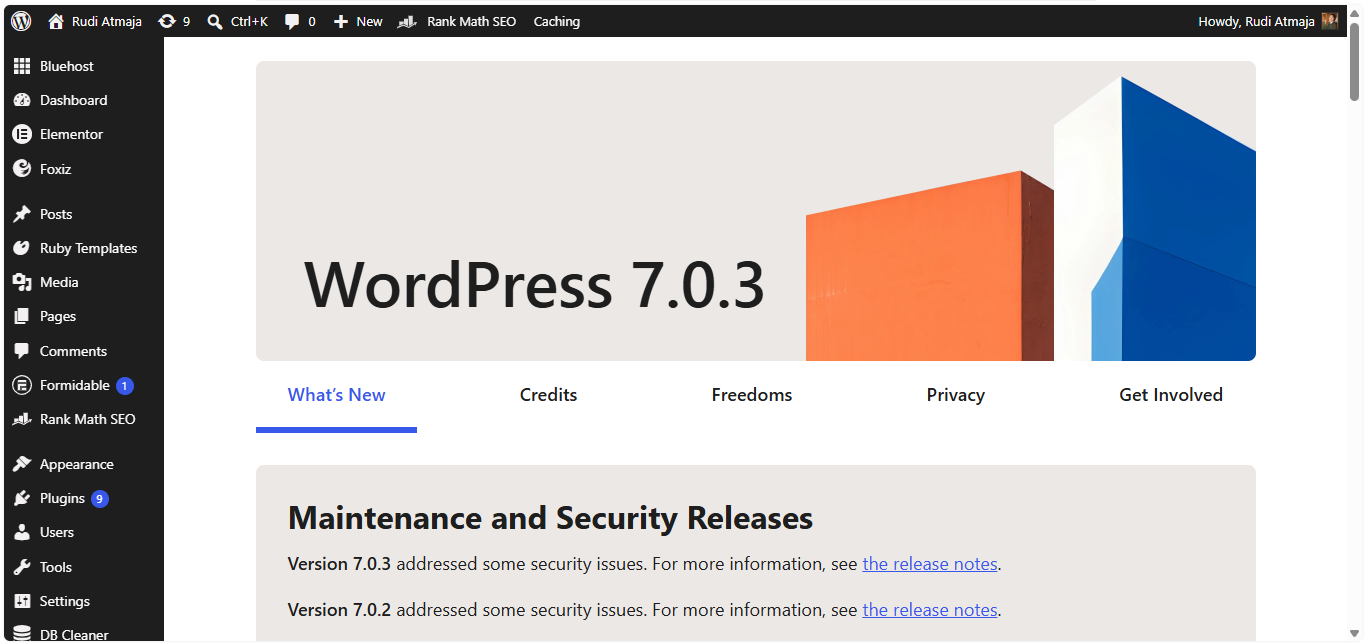
WordPress.org is the official website where you can download the WordPress software and learn more about the open-source WordPress project. Unlike WordPress.com, WordPress.org does not provide a complete website hosting service where you simply create an account and your website is ready to go. Instead, it provides the WordPress software that you can install on a web server of your choice. This is why websites built this way are commonly called self-hosted WordPress websites.
The easiest way to understand this is to imagine that building a website is like opening a physical store. WordPress is the equipment and system you use to run the store, while web hosting is the actual building where the store exists. WordPress.org gives you the software, but you need to rent the “building” yourself by choosing a hosting provider. You also need an address for people to find the store, which is what a domain name does.
When you use WordPress.org, the WordPress software itself is free to download and use. However, a WordPress website still needs a server connected to the internet so visitors can access it. This is where a web hosting provider comes in like Bluehost, Pressable or Kinsta. You pay the hosting company to provide server space and resources for your website, while WordPress runs on that server and handles the content management side of the site.
A domain name is another separate part of the setup. If hosting is the place where your website lives, the domain is the address people type into their browser to reach it. For example, if your website uses example.com, that domain points visitors toward the server where your WordPress installation is hosted. The domain and hosting are therefore two different services, although many hosting companies offer both together.
Once you have hosting and a domain, WordPress needs to be installed on the server. Many modern hosting providers offer a one-click or automated WordPress installation, so you may not actually have to download the software and upload every file manually. After the installation is complete, you can log in to the WordPress dashboard and start building the website. From that point onward, the dashboard becomes the main place where you create content and manage many aspects of the site.
The WordPress dashboard is where you can create posts and pages, upload images and other media, manage comments, create navigation menus, choose themes, install plugins, and configure website settings. The familiar WordPress block editor allows you to build pages by adding different content blocks rather than writing every part of the page from scratch. You can add headings, paragraphs, images, galleries, buttons, videos, forms, and many other elements depending on the tools available on your installation.
One of the defining characteristics of WordPress.org is the level of control you have over the software and website environment. Because you are using a self-hosted installation, the website files belong to your hosting account rather than being locked inside a hosted website platform. You can access those files through tools such as a hosting file manager, SFTP, or SSH when your hosting provider supports them. Developers can also work directly with the WordPress code and create custom themes, plugins, or other functionality.
Plugins are particularly important because they allow you to add features without building everything yourself. A plugin can add an SEO system, contact forms, ecommerce functionality, membership features, analytics, security tools, backups, caching, custom post types, or almost any other functionality that has been developed for WordPress. WordPress.org has a large official plugin directory containing thousands of free plugins, while many developers and companies also distribute premium plugins independently. You can decide which plugins to install based on what your website needs.
Themes work in a similar way on the design side. A WordPress theme controls much of the visual presentation of your website, including layouts, typography, navigation, headers, footers, and other design elements. You can choose from free themes in the official WordPress theme directory, purchase premium themes from third-party developers, or create a completely custom theme if you have the necessary development skills. Because the theme is separate from your content, you can generally change the visual design without having to recreate every article or page.
The database is another important part of a self-hosted WordPress website, although most beginners will rarely need to interact with it directly. WordPress stores much of the website’s dynamic information in a database, including posts, pages, settings, user information, and other data. The WordPress files and the database work together to generate the website that visitors see in their browsers. Your hosting provider usually supplies the database environment, while WordPress provides the software that communicates with it.
This is where the idea of “self-hosted” becomes important. You are not building WordPress from scratch, and you are not expected to manually manage every line of code. You are essentially taking the WordPress software and installing it in a hosting environment that you control. The hosting provider supplies the server, while WordPress provides the content management system, and you decide how the website is configured and what functionality it has.
There is also a distinction between WordPress.org and the WordPress website that you eventually create. WordPress.org itself is not your hosting provider, and it is not the server where your website automatically lives. It is the official home of the open-source WordPress software, documentation, community resources, themes, plugins, and downloads. Your actual website exists on the hosting account you choose and runs using the WordPress software installed there.
This setup gives you a great deal of freedom over how the website is built. For example, you can choose a hosting provider based on price, performance, server location, technical requirements, or specific features. You can move your website to another hosting provider if you decide that your current one no longer fits your needs. You can also change themes, install different plugins, modify files, and build custom functionality without waiting for a hosted platform to add support for a particular feature.
To picture the difference, imagine buying a plot of land and building a house on it. The land is your hosting account, the address is your domain name, and WordPress is the structure and system that turns the space into a functioning website. You can choose the layout, renovate parts of the house, add new rooms, install different equipment, and decide which services you want to use. You still have to pay for the land and take care of the property, but you have much more freedom over what you do with it.
That freedom also means that some responsibilities belong to you. Depending on your hosting setup, you may need to keep WordPress, themes, and plugins updated, maintain backups, monitor security, and deal with compatibility problems when different components interact. Your hosting provider may help with some of these tasks, especially if you use managed WordPress hosting, but the exact level of support depends on the provider and hosting plan you choose. With self-hosted WordPress, there is no single company automatically responsible for every part of the website.
WordPress.org is therefore best understood as the starting point for running WordPress on infrastructure that you choose yourself. The software gives you the core system for managing your website, while hosting provides the server, a domain gives the website its address, themes control much of its appearance, and plugins extend what it can do. These components work together to create the website visitors ultimately interact with. Once you understand how those pieces connect, the term “self-hosted WordPress” becomes much less mysterious.
Pros and Cons of WordPress.org
Now that the basic setup is clear, the more interesting question is what you actually gain by running WordPress yourself. WordPress.org gives you a different level of ownership and flexibility because the website is installed on hosting that you choose rather than living inside a single managed platform. That difference affects everything from the plugins and themes you can use to the way you manage the technical side of your site.
That extra freedom can be a major reason to choose self-hosted WordPress, but it also comes with responsibilities that you don’t have to think about as much with a managed platform. You may have more control over your files, database, hosting environment, and website configuration, but you are also more involved in keeping those pieces working properly. The experience can therefore be very different depending on whether you enjoy having that control or would rather leave more of the technical work to someone else.
Looking at both sides is useful because WordPress.org is not simply a more advanced version of WordPress.com. It is a different way of running WordPress, with its own trade-offs. Before getting into the limitations, let’s first look at what makes self-hosted WordPress so appealing.
1. Advantages of WordPress.org
The biggest advantage of WordPress.org is the amount of control you have over your website. Since you install WordPress on hosting that you choose, you are not limited to the features, infrastructure, or customization options provided by a single managed platform. You can choose your hosting provider, decide how the server should be configured, install the software you need, and modify the website files when necessary. For someone building a website with specific technical requirements, that freedom can make a significant difference.
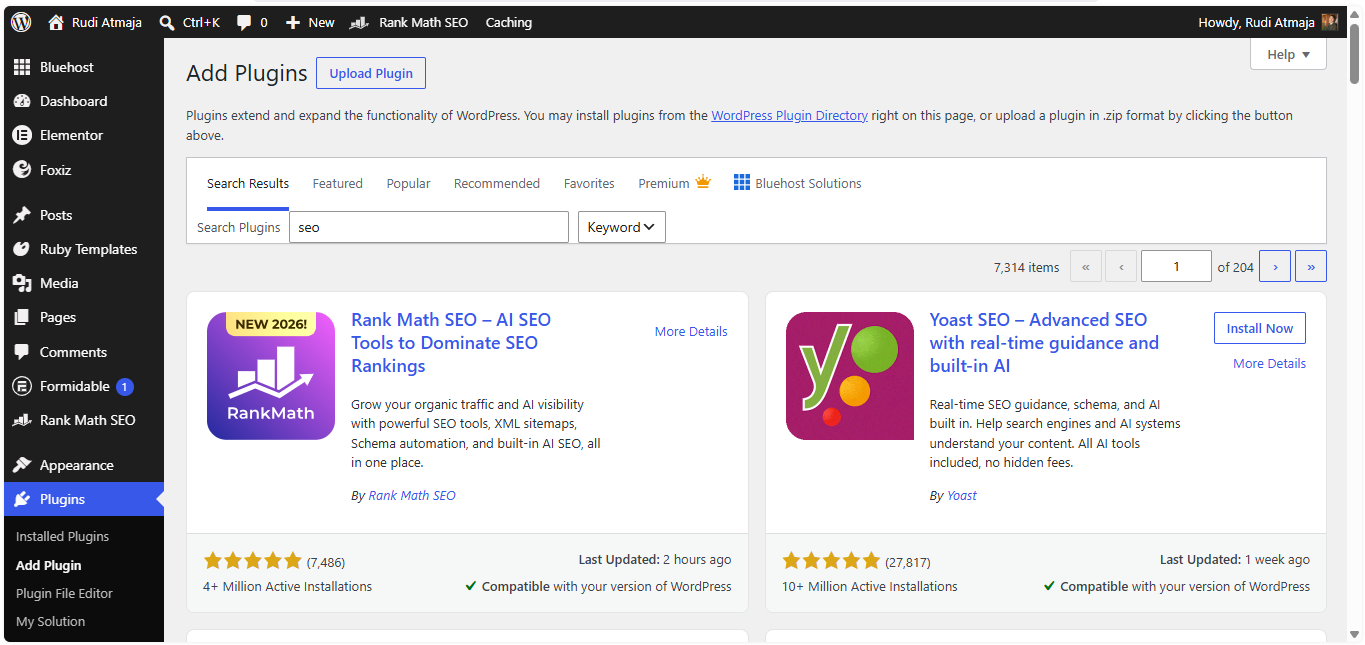
You also have complete access to the WordPress plugin ecosystem. You can install free plugins from the official WordPress.org plugin directory, purchase premium plugins from third-party developers, or create your own plugin if you have the technical skills to do so. Plugins can add almost any kind of functionality to a WordPress website, from SEO and contact forms to ecommerce, memberships, forums, bookings, learning management, analytics, and custom business systems. You are not restricted to a small selection of extensions approved by a particular hosted platform.
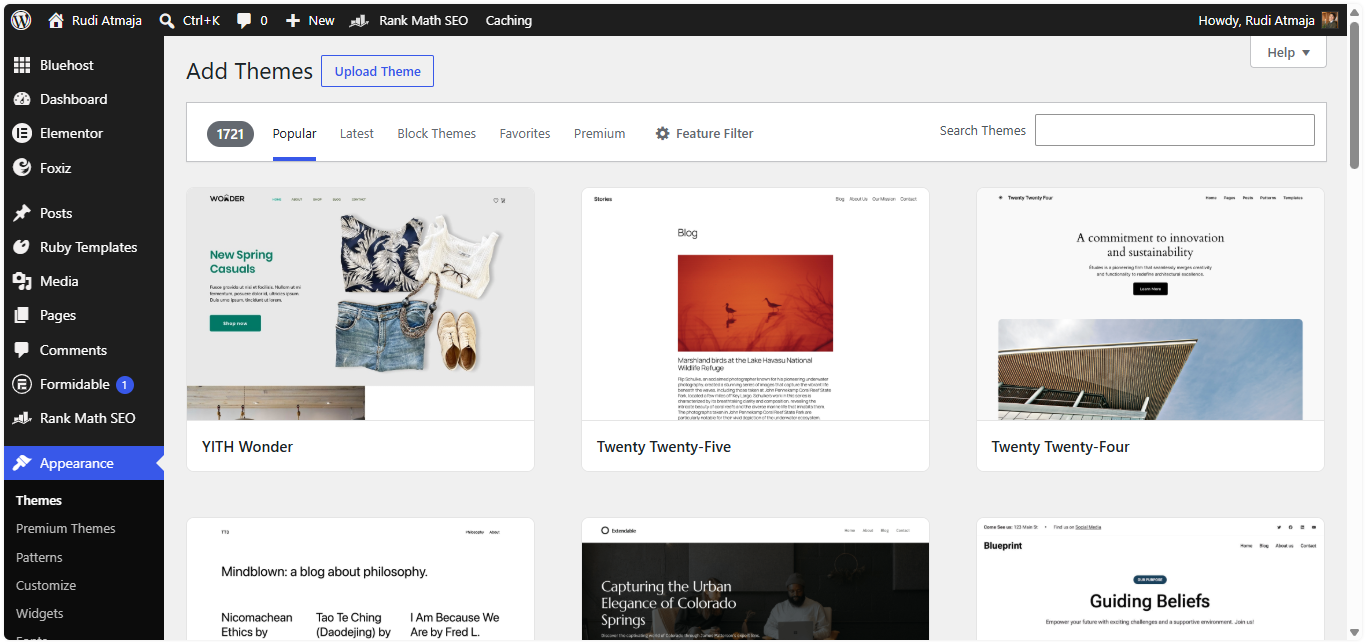
The same applies to themes. With self-hosted WordPress, you can use free themes from the official WordPress theme directory, purchase premium themes, download themes from third-party marketplaces, or develop your own theme. If you have a designer or developer working on your site, they can modify an existing theme or build a completely custom front end around your requirements. This makes WordPress.org suitable for websites where the visual design needs to go beyond what a standard theme can provide.
Another important advantage is access to your website’s files and database. You can use a hosting file manager, SFTP, SSH, or other tools provided by your hosting company to work directly with the WordPress installation. You can also access the database through tools such as phpMyAdmin or the database management system provided by your host. This level of access can be extremely useful when a developer needs to troubleshoot a problem, migrate a website, optimize a database, or build functionality that depends on direct access to the underlying WordPress environment.
You also have more freedom when choosing your hosting environment. Different hosting providers offer different server locations, hardware resources, caching systems, PHP configurations, storage options, and infrastructure. You can start with inexpensive shared hosting for a small website and move to a more powerful VPS, cloud server, or managed WordPress host as your traffic and technical requirements grow. You are not tied to the infrastructure of one website platform.
Read also: What is Web Hosting?
That flexibility also makes website migration easier to approach. Because you control the WordPress installation and its underlying files and database, you can move the site from one hosting provider to another when necessary. The process still requires technical steps, such as transferring files, moving the database, updating configuration, and checking the domain, but the website itself is not inherently tied to one hosting company’s infrastructure. This can be particularly important for businesses that want the freedom to change providers as their needs evolve.
WordPress.org is also well suited to websites that require custom functionality. A developer can create custom plugins, modify theme files, add custom post types, build specialized database structures, connect WordPress to external APIs, or create custom workflows for a business. For example, a company could build an internal publishing system that connects WordPress to another application, or create a membership platform with rules that are specific to its business model. As long as the required functionality can be implemented within the hosting environment and WordPress architecture, there is considerable room to build beyond standard website features.
Another advantage is that you can choose which services you want to use for important parts of your website. You can select your own backup solution, security tools, CDN, analytics platform, email service, caching system, image optimization service, or performance tools. If one service no longer works for your needs, you can replace it with another. This modular approach means your website does not have to depend on a single company’s entire technology stack.
You also have more direct control over performance optimization. Depending on your hosting environment, you can configure server-level caching, object caching, PHP settings, database optimization, CDN integration, image optimization, and other performance techniques. Advanced users can fine-tune different parts of the stack to suit the type of website they are running. A high-traffic publication, for example, may have very different performance requirements from a small portfolio website, and self-hosted WordPress gives the technical team more room to optimize for those requirements.
Security can be handled in a similarly flexible way. You can choose the security plugins and services you trust, configure firewall and login protection tools, implement additional authentication methods, manage user permissions, and use server-level security features offered by your hosting provider. You are responsible for making those decisions, but you are not limited to a security system provided by one platform. Developers and administrators can build a security setup around the specific risks and requirements of the website.
WordPress.org is also attractive because the core WordPress software is open source. The source code is publicly available, and developers around the world can inspect it, contribute to the project, build extensions, and create solutions around it. This has helped create a large ecosystem of hosting companies, plugin developers, theme developers, agencies, freelancers, and WordPress-focused tools. If you run into a problem or need a specialized solution, there is a broad community and commercial ecosystem built around WordPress.
Another practical advantage is that you can build websites that are not limited to a particular type of content or business model. WordPress can power a personal blog, corporate website, online magazine, ecommerce store, membership platform, online course, directory, community website, booking system, or a much more specialized application. The core software does not force you into one particular format. Your hosting environment, themes, plugins, and custom development determine how far you can take the website.
For developers, WordPress.org also provides a much more familiar environment for working with standard web technologies. You can work with PHP, JavaScript, HTML, CSS, MySQL or MariaDB, APIs, command-line tools, version control workflows, and deployment processes depending on your hosting setup. Developers can create a local WordPress installation for development, test changes before publishing them, and use staging environments when supported by the hosting provider. This makes self-hosted WordPress suitable for professional development workflows as well as straightforward website creation.
Finally, you are not required to use a particular hosting company simply because you use WordPress. WordPress.org provides the software, while the hosting provider supplies the environment where that software runs. That separation gives you the ability to compare providers, negotiate hosting costs, change infrastructure, and select technical resources based on the actual needs of your website.
2. Disadvantages of WordPress.org
The biggest downside of WordPress.org is that getting a website online involves more than simply creating an account. You need to purchase a domain, choose a hosting provider, install WordPress, and connect everything before visitors can access your site. Most hosting companies make the installation process fairly simple, but there are still more moving parts to understand compared with a fully managed platform.
Choosing the right hosting provider can also take some time. Different hosting plans come with different amounts of storage, server resources, performance, backup options, security features, and technical support. A plan that works perfectly for a small blog may not be enough for a busy business website or online store. You therefore need to look beyond the advertised price and consider what your website actually needs from its hosting environment.
Once WordPress is running, you also become responsible for keeping the software up to date. WordPress itself, along with its themes and plugins, receives regular updates that can include security fixes, bug fixes, and compatibility improvements. Most updates are straightforward, but problems can occasionally appear when an updated plugin conflicts with another plugin, a theme, or custom code.
Security is another responsibility that comes with running self-hosted WordPress. The WordPress project itself is actively maintained, but the security of your individual website also depends on things such as your hosting environment, passwords, user permissions, themes, plugins, and configuration. You can add firewalls, malware scanning, login protection, and other security measures, but you need to decide which protections are appropriate for your site and keep them properly configured.
Backups require similar attention. Your hosting provider may include automatic backups, but the frequency, retention period, and restoration process can vary considerably between providers. You can also use a WordPress backup plugin or an external backup service, but simply installing a backup tool does not guarantee that you have a usable copy of your website. You need to know where the backups are stored and how to restore both your WordPress files and database if something goes wrong.
The huge plugin ecosystem can be another source of problems. WordPress.org gives you access to thousands of free plugins as well as countless premium options from third-party developers, but not every plugin is maintained to the same standard. A plugin that has not been updated for a long time may become incompatible with newer versions of WordPress, while poorly chosen plugins can create security or performance issues.
Themes come with similar considerations. You can choose a free theme, purchase a premium theme, customize an existing design, or build a completely custom theme, but each approach comes with its own maintenance requirements. A heavily customized theme may need additional work when WordPress or other components are updated, particularly if the site relies on custom code.
Website performance can also require active management. WordPress itself is capable of running fast, but the actual speed of a website depends on the hosting environment, theme, plugins, images, database, caching, CDN, and traffic levels. A lightweight blog may need very little optimization, while a large publication or ecommerce site can require several layers of performance tuning.
The cost of running WordPress.org can also vary depending on how ambitious the website becomes. The WordPress software is free, but you normally need to pay for hosting and a domain, and you may eventually add premium themes, plugins, security services, backup solutions, email services, or professional development. A basic website can remain relatively inexpensive, but a complex website can require a considerably larger budget.
There is also a learning curve that comes with having control over so many parts of the website. You don’t need to be a developer to use WordPress.org, but concepts such as DNS, SSL, hosting, plugins, themes, backups, caching, and security become easier to manage once you understand what they do. When something breaks, you may also need to work out whether the problem comes from WordPress, a plugin, a theme, custom code, the database, or the hosting environment. That troubleshooting process can take time, particularly when you’re managing your first self-hosted website.
The difference becomes especially noticeable when you compare self-hosted WordPress with a managed platform. With WordPress.org, you have more responsibility for the hosting environment, maintenance, security, backups, and technical configuration, while WordPress.com handles much of that infrastructure for you.
What Types of Websites Can You Build With WordPress.org?
WordPress.org can be used to build a surprisingly wide range of websites because the software itself does not force you into a particular type of website. You can start with a simple blog and gradually turn it into something much more sophisticated by adding themes, plugins, custom code, and third-party services. Because you choose the hosting environment yourself, you also have more freedom to decide how the website is configured and what it needs to run. This makes self-hosted WordPress suitable for everything from small personal websites to complex business platforms.
A blog or content website is one of the simplest things you can build with WordPress.org. WordPress was originally associated heavily with blogging, and its publishing system still makes it well suited to articles, news, tutorials, reviews, magazines, and other content-heavy websites. You can organize content with categories and tags, create custom post types, build author profiles, add search functionality, and extend the publishing workflow with plugins. A site can remain a straightforward blog or grow into a much larger publication as its requirements change.
WordPress.org is also commonly used for business websites. A company can create pages for its services, products, team, locations, contact information, case studies, and other business content. Plugins can add lead-generation forms, appointment systems, live chat, customer portals, analytics, CRM integrations, and other features that a business may need. Because the website owner controls the hosting and WordPress installation, developers can also create custom functionality when an off-the-shelf plugin is not enough.
A portfolio website is another natural use case. Designers, photographers, writers, developers, architects, artists, and other professionals can create custom layouts to showcase their work. WordPress.org gives you access to a large selection of themes and portfolio plugins, while custom development can be used when the portfolio needs a completely unique design. You can also integrate external services for video, photography, social media, booking, or other types of professional work.
You can also build a full online store with WordPress.org. WooCommerce is one of the most widely used ecommerce solutions in the WordPress ecosystem and can turn a WordPress installation into a store with products, shopping carts, checkout, payments, inventory, shipping, taxes, and customer accounts. Additional extensions can add subscriptions, memberships, bookings, marketplaces, product customization, and other ecommerce features. Because you control the WordPress installation, you can also modify the store’s functionality or connect it to external systems when the standard features are not enough.
Membership websites are another strong use case for WordPress.org. You can create different types of user accounts, restrict certain content, offer paid memberships, create subscription levels, and provide members with access to private areas of the website. Membership plugins can handle much of the functionality, while custom development can be added when the membership rules become more complicated. This makes WordPress suitable for communities, professional organizations, private publications, educational websites, and subscription-based businesses.
An online learning platform can also be built with self-hosted WordPress. Learning management system plugins can add courses, lessons, quizzes, student accounts, progress tracking, certificates, and payment functionality. A website can therefore go well beyond simply publishing educational articles and become a complete learning environment. The hosting resources become increasingly important as the number of students, courses, videos, and simultaneous users grows.
WordPress.org can also power directory and listing websites. You can create directories for businesses, properties, jobs, events, services, restaurants, products, or other types of listings. Plugins can provide searchable databases, filtering, user submissions, location-based searches, reviews, paid listings, and membership systems. Since the underlying WordPress installation is accessible, developers can create custom data structures and search functionality when a standard directory plugin does not provide everything the project needs.
A news or online magazine website can take advantage of WordPress’s publishing system and its large ecosystem of editorial tools. Multiple authors can publish content, editors can manage submissions, articles can be organized into sections, and custom layouts can be created for different types of stories. Plugins can also add newsletters, paywalls, social sharing, advertising management, analytics, and other publishing features. This makes WordPress.org a common choice for publishers that need more control over their content workflow.
You can even use WordPress.org as the foundation for a custom web application. WordPress is not limited to websites where every page is a conventional blog post or static page. Developers can create custom post types, database structures, APIs, user roles, dashboards, workflows, and integrations with external applications. A company could, for example, build a customer portal or an internal system around WordPress rather than using it only as a public-facing website.
This level of flexibility means there are very few conventional website categories that WordPress.org simply cannot support. The more important question is whether WordPress is the right technology for the particular project. A developer can extend WordPress considerably, but that does not mean every possible web application should be built on it. At some point, a project may have requirements that are better served by software designed specifically for that purpose.
For example, a highly specialized real-time application may not be the best candidate for WordPress. A platform that depends heavily on real-time multiplayer communication, extremely low-latency data processing, continuous live connections, or large-scale event streaming may be better built with technologies designed specifically for those workloads. WordPress can still be used for the marketing website or content management side of such a project, but forcing the entire application into WordPress could create unnecessary complexity.
The same applies to applications that require unusual server infrastructure or complete control over the technology stack. WordPress itself can be customized extensively, but it still has its own architecture and way of managing content, users, themes, plugins, and databases. If a project requires a completely different backend architecture, specialized server software, unusual programming languages, or infrastructure that does not fit naturally into a WordPress environment, another technology may be a better foundation. In those cases, WordPress could still be used alongside the application rather than being the application itself.
There are also projects where using WordPress.org would simply be excessive. If all you need is a very simple website with a few pages and no dynamic functionality, setting up hosting, WordPress, themes, plugins, updates, backups, and security may introduce more infrastructure than the project actually needs. A simple static site or a lightweight website builder could accomplish the same goal with less ongoing management. WordPress.org is capable of handling the project, but capability alone does not make it the most practical choice.
Hosting requirements can become another limiting factor for very large websites or applications. WordPress.org gives you control over the hosting environment, but you are still responsible for choosing infrastructure capable of handling the traffic and workload. A website with millions of visitors, large databases, heavy search operations, or complex background processes may require advanced server architecture, database optimization, caching layers, CDNs, load balancing, and experienced developers. WordPress can participate in such an architecture, but it is no longer a simple “install WordPress and you’re done” situation.
There are also websites that cannot be operated through WordPress.org because of restrictions imposed by the hosting provider, payment processor, domain registrar, or applicable laws. WordPress.org itself is open-source software, but your hosting environment still has terms of service and acceptable-use policies. A hosting provider may prohibit certain types of content, services, or activities even if WordPress technically has the ability to display them. The limitation in those cases comes from the infrastructure or service provider rather than from WordPress itself.
For many ordinary websites, however, the bigger question is not whether WordPress.org can build them but whether you actually need the additional control. A personal blog, portfolio, small business website, simple publication, or relatively straightforward content site can certainly run on self-hosted WordPress. But if the main goal is to publish content without spending much time managing hosting, backups, security, performance, and other technical details, WordPress.com can be a more convenient choice for blogs, portfolios, personal websites, and small business websites.
WordPress.com can also make sense for content-focused websites that don’t require extensive server-level customization. A writer who mainly wants to publish articles, a creator building a portfolio, or a small business that needs a professional online presence may not need direct access to the server or database. Having WordPress and hosting managed through the same platform can simplify the day-to-day experience while still providing access to themes, publishing tools, and, on paid plans, plugins.
The same consideration applies to some online stores and membership websites. WordPress.com supports WooCommerce and plugin installation on paid plans, so you do not automatically need self-hosted WordPress simply because a website needs ecommerce or additional functionality. If the required features are supported and the business does not need unusual server configurations, a managed WordPress.com environment can reduce the amount of technical maintenance involved. On the other hand, a store or membership platform with highly specialized requirements may benefit more from the control available through WordPress.org.
In practical terms, WordPress.org is most attractive when control and customization are important parts of the project. It gives you the freedom to choose your hosting, install almost any compatible plugin or theme, access your files and database, modify the code, and build functionality specifically around your requirements. WordPress.com is more attractive when convenience and managed infrastructure matter more than having control over every technical layer. The two can build many of the same types of websites; the bigger difference is how much of the technical environment you want to manage yourself.
Is WordPress.org Right for You?
WordPress.org gives you a lot of room to build a website your own way. You can choose the hosting, install the themes and plugins you need, access the website files and database, and customize the site far beyond a basic template. That makes it a strong option for businesses, publishers, online stores, developers, and anyone whose website needs a level of control that a managed platform may not provide.
At the same time, that freedom comes with more responsibility. You need to think about hosting, updates, backups, security, performance, and the compatibility of the different components running on your site. For some website owners, that is a worthwhile trade-off because they want complete control; for others, managing all of those technical details may simply be more work than they want to take on.
The important thing is to choose based on what your website actually needs rather than assuming that self-hosted WordPress is always the better option. If you want maximum flexibility and control, WordPress.org gives you the foundation to build and customize almost any conventional website. If you prefer having more of the technical side managed for you, WordPress.com may be the more suitable approach.