


Choosing the right WordPress theme can make a big difference in how your website looks, feels, and works. When I started using JNews on BuildWithWP, I wanted a theme that could support a content-focused website without making everyday publishing unnecessarily complicated. In this review, I’ll share my experience using JNews in 2026, including the things I like, the challenges I’ve encountered, and the features that matter most in my day-to-day workflow.
JNews is a WordPress theme designed primarily for news websites, online magazines, blogs, and other content-driven publications. It offers a range of layout options and customization features that let you shape your website around your content. However, having plenty of features doesn’t automatically make a theme the right choice, so I’ll focus on how JNews fits into my actual experience rather than simply repeating its feature list.
Before going further, it helps to understand the difference between a WordPress theme and a plugin. A theme mainly controls your website’s appearance and layout, while plugins add or extend functionality. If you’re still figuring out which one you need, take a look at my article on “WordPress Themes vs Plugins“, where I explain how these two parts of WordPress work together and when you might need each of them.
Your choice of WordPress platform also matters when setting up a website. WordPress.com and WordPress.org are often confused because they share the WordPress name, but they offer different approaches to building and managing a site. If you’re new to the platform, my guide “What Is WordPress.com?“ explains the hosted service and what you should know before choosing it for your website.
On the other hand, “What Is WordPress.org?” covers the open-source WordPress software that you can install on a hosting account you manage. This distinction is worth understanding because your hosting arrangement, available features, and control over your website can affect how you approach theme installation and customization. Knowing which platform you use will also help you determine whether JNews fits your setup.
For this review, I’m looking at JNews from the perspective of someone using it on BuildWithWP, rather than evaluating it only through a demo website. I want to consider how it works when managing real content, adjusting layouts, and handling the practical tasks involved in running a WordPress blog. Where relevant, I’ll also distinguish between what I’ve personally experienced and what the theme offers according to its published features.
I’ll explore the aspects that can influence your decision, including design flexibility, customization, content presentation, usability, and the overall experience of working with the theme. I’ll also consider the potential drawbacks and the kinds of websites that may benefit most from JNews. Not every feature will be equally useful to every website owner, so the goal is to help you understand what to consider before making a decision.
If you’re thinking about using JNews for your own blog, magazine, or content-focused website, this review will give you a closer look at the theme through my experience with BuildWithWP. Rather than assuming that one theme is suitable for everyone, I’ll focus on the practical details that can help you decide whether it matches your needs. Let’s start by looking at what JNews offers and how it fits into my WordPress setup.
JNews WordPress Theme Review
JNews is a premium WordPress theme designed for news websites, online magazines, blogs, and other content-focused publications. It offers a variety of layouts and customization options to help you build a website that matches your content and brand. If you want a website with a more editorial look, JNews is one of the themes worth exploring, especially if you plan to publish articles regularly.
Unlike free themes available in the WordPress theme directory, JNews is a premium product you can purchase through ThemeForest. Before buying it, you can explore its demos and available features to see whether its design fits your website. Keep in mind that a demo shows what the theme can look like, while your actual results will depend on your configuration, content, and customization choices.
You can also use JNews on WordPress.com if your account has a paid plan that supports third-party theme installation. WordPress.com allows plugin and theme installation on its paid plans, subject to its platform requirements and compatibility considerations.
👉 Explore WordPress.com plans and choose the right one for your website.
If you need help getting started, check out my guide, How to Install a Theme on WordPress.com, for the steps involved in adding a theme to your site.
JNews is also suitable for self-hosted WordPress websites powered by WordPress.org, where you can install the theme through your WordPress dashboard after purchasing and downloading the required files. This setup gives you control over your hosting environment and lets you manage your website’s theme and plugins within the capabilities of your hosting account. If you’re using this version of WordPress, my tutorial How to Install a Theme on WordPress.org can guide you through the installation process. In the sections below, I’ll share my experience with JNews on BuildWithWP and explain the features and practical details that stood out during my use.
1. JNews Features
JNews is a premium WordPress theme developed for news websites, online magazines, blogs, and other content-driven publications. Its feature set covers several parts of running a publishing website, including page design, content management, social engagement, advertising, subscriptions, and multimedia publishing. Rather than offering only a collection of visual layouts, JNews combines theme settings with dedicated tools and companion plugins for building different types of publishing websites.
One of the first features to understand is Automatic Demo Import. JNews allows you to select a prebuilt website demo and import its layouts, content, and styling instead of recreating the entire design manually. Depending on the import options available for the selected demo, you can also install the required plugins and choose the page builder used for the imported content. This provides a starting point for creating a news portal, magazine, technology blog, food website, or another type of publication, although you will still need to replace demonstration content and configure the site for your own needs.
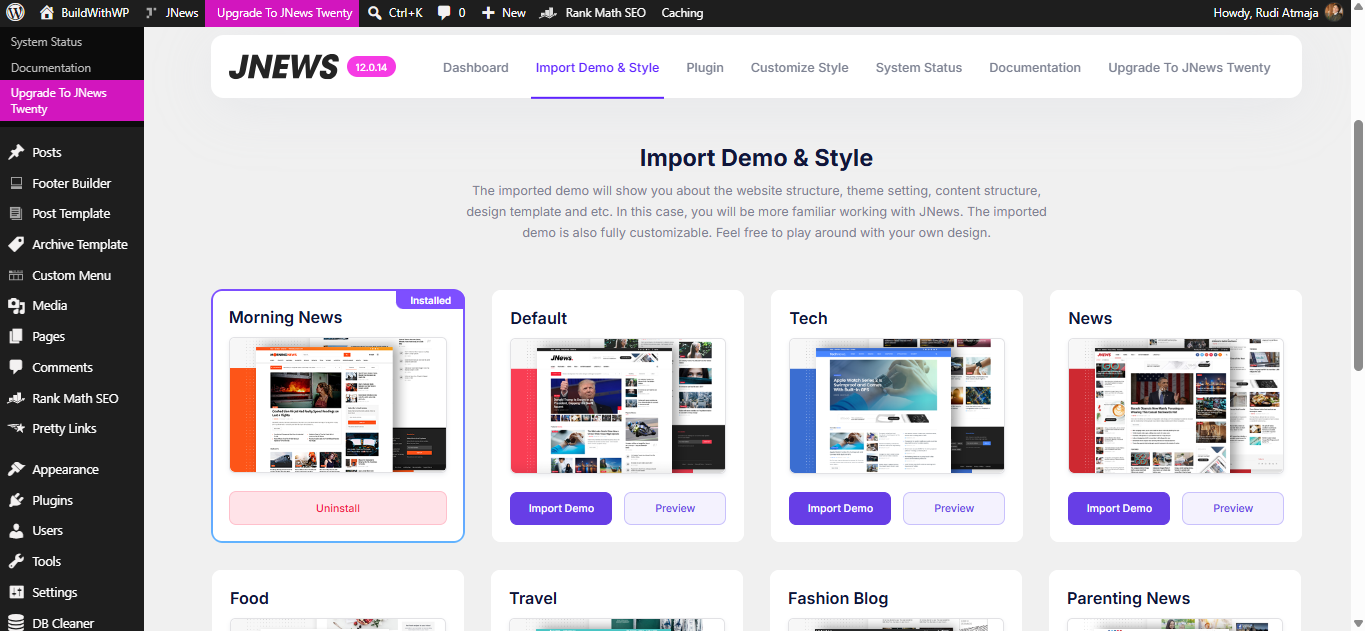
JNews offers a collection of Prebuilt Website Demos and Homepage Layouts for different publishing niches. The available designs cover subjects such as technology, business, fashion, food, travel, sports, gaming, health, photography, and general news. These layouts provide different arrangements of featured stories, article grids, category sections, and other content areas, allowing you to start with a design that resembles your intended website. The product listing advertises more than 150 homepage demos, while the number and selection of available designs may vary across the theme’s promotional pages and updates.
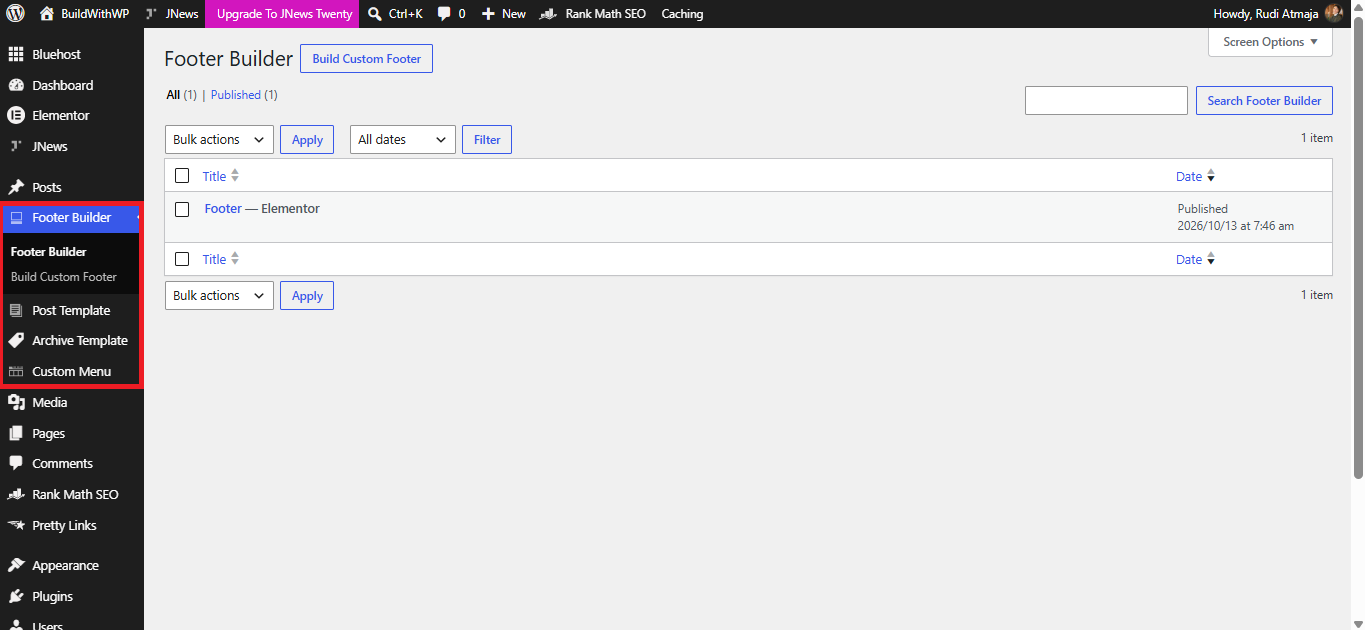
For website navigation, JNews includes a Header Builder with Live Preview. This feature lets you configure the header area, where visitors typically find your logo, navigation menu, and other site controls. The live preview helps you see how changes affect the design as you make them, while the available header layouts provide different starting points for arranging these elements. JNews also lists seven footer styles, giving you options for organizing footer content and choosing a layout that fits the rest of the website.
The theme’s Mega Menu feature provides another way to organize navigation. Instead of displaying only a simple list of links, a mega menu can present a larger menu area with multiple columns or additional content, depending on the configured layout. This can be useful for publications with many categories and subcategories because visitors can explore related sections from one navigation point. JNews lists a built-in Mega Menu among its included features, so the menu system is part of the theme’s publishing toolkit.
For individual articles, JNews provides Single Post Templates and a Single Post Template Builder. The theme lists ten single-blog templates, giving you different ways to arrange the content on article pages. These templates can affect how elements such as the headline, featured image, post information, and article body appear together. This is particularly relevant to publishing websites because the single-post layout is used repeatedly across articles, making it an important part of the site’s overall reading experience.
The Archive Page Template Builder allows you to customize the layouts used for archive pages. These pages can include collections of posts based on dates, authors, tags, or other archive criteria supported by WordPress and the theme. Rather than relying entirely on one standard archive layout, you can use the builder to structure how posts are displayed in these sections. This gives you additional control over how visitors browse older content and discover articles beyond the homepage.
JNews also includes a Category Page Template Builder for organizing content around specific subjects. A technology category, for example, could use a different article arrangement from a lifestyle or food category, depending on the templates and modules you configure. This makes it possible to structure category pages around their content rather than displaying every category in exactly the same way. The feature is especially relevant to publications that cover multiple topics and need clear ways for visitors to explore each section.
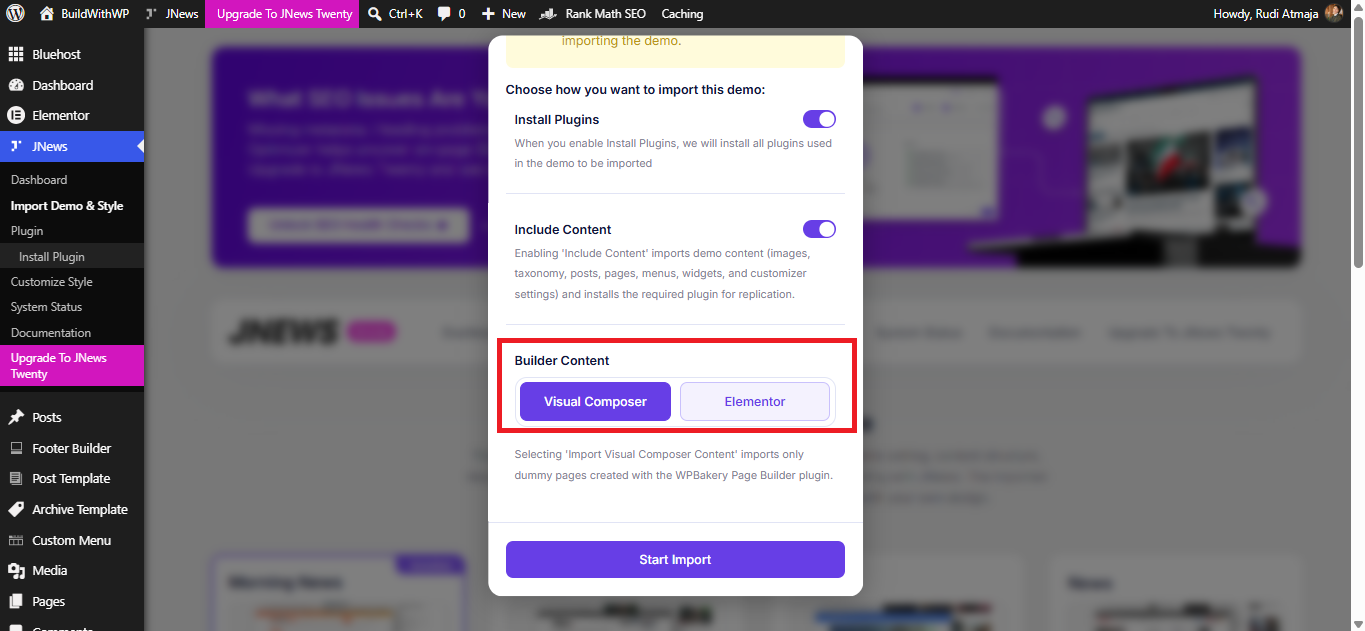
JNews also includes Page-Building Integration for creating and arranging website layouts. The product listing identifies support for Elementor, WPBakery Page Builder, and Gutenberg, allowing you to work with different content-building approaches. Elementor and WPBakery provide visual editing interfaces, while Gutenberg uses WordPress’s block editor to structure page content. The available editing experience depends on the builder you choose and whether the relevant plugin is installed and activated.
Another layout option is Split Content, which allows a post to be divided into multiple parts rather than displayed as one uninterrupted article. JNews lists five split-content templates and also includes a split-post-content feature. Depending on the selected format and configuration, this can be used to structure content into separate sections or stages. The theme also lists truncated mobile article content, providing an option for controlling how article content is presented on mobile devices.
JNews includes Responsive Design and Mobile-Friendly Layouts to adapt website content to different screen sizes. This is important for publications because visitors may read articles on desktop computers, tablets, and smartphones. The theme also offers a horizontal-scrolling mobile menu, which provides another way to navigate categories on smaller screens. Actual usability still depends on the chosen layout, content dimensions, and testing across different devices.
For readers browsing a large collection of articles, JNews provides Infinite Scroll and Automatic Next-Post Loading. Infinite scroll allows additional posts to appear as visitors move through a listing, reducing the need to navigate through traditional pagination. The automatic next-post feature can load another article after a reader reaches the appropriate point in the current post, depending on the configured behavior. These features offer alternative ways to move between pieces of content without requiring a separate manual click for every transition.
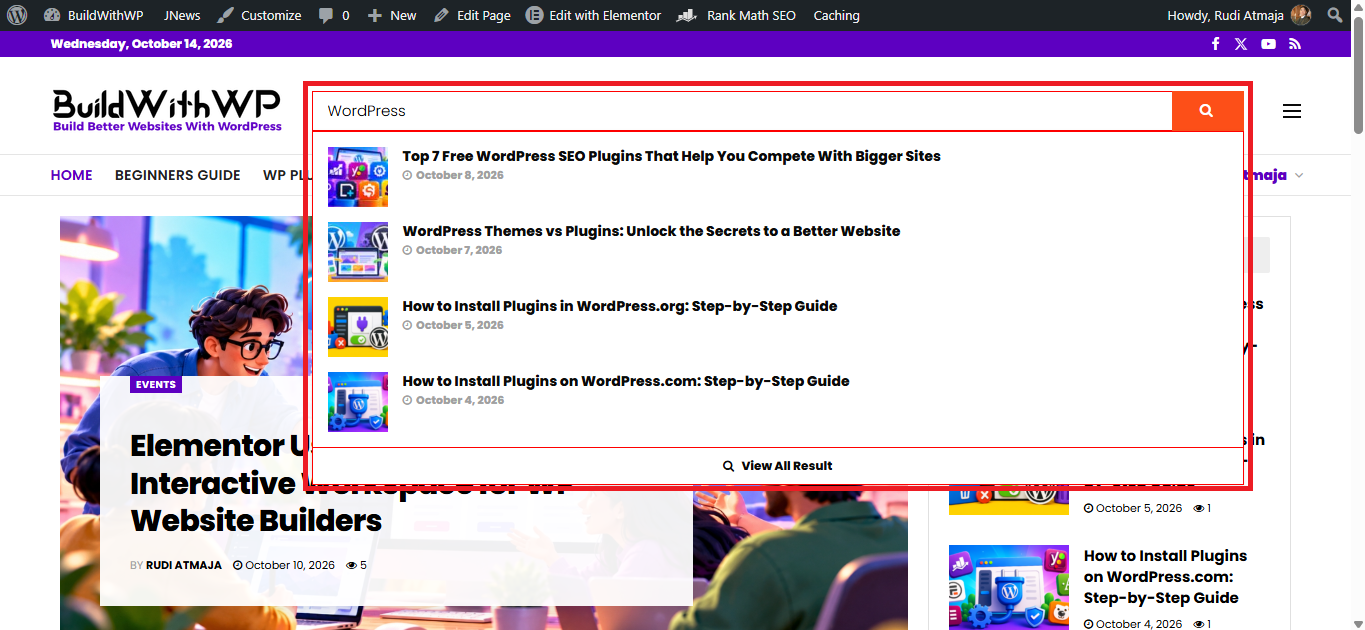
The theme also includes Live Search, which helps visitors find content through a search interface that can display results as they type. This can be useful on websites with large article libraries, where browsing categories alone may not be the fastest way to locate a particular tutorial or news story. JNews also lists popular-post features and a view counter, which can display article popularity using post-view information. Together, these tools provide ways to search for content and highlight articles that attract attention.
To help readers understand how long an article may take to read, JNews offers a Reading Progress Bar and Estimated Reading Time. The progress indicator can show how far a visitor has moved through an article, while the estimated reading time gives readers an indication of the time required to finish it. These features are especially relevant to long-form articles, guides, and magazine content. JNews also includes inline related posts, allowing related articles to be inserted within the reading experience rather than appearing only at the end of a page.
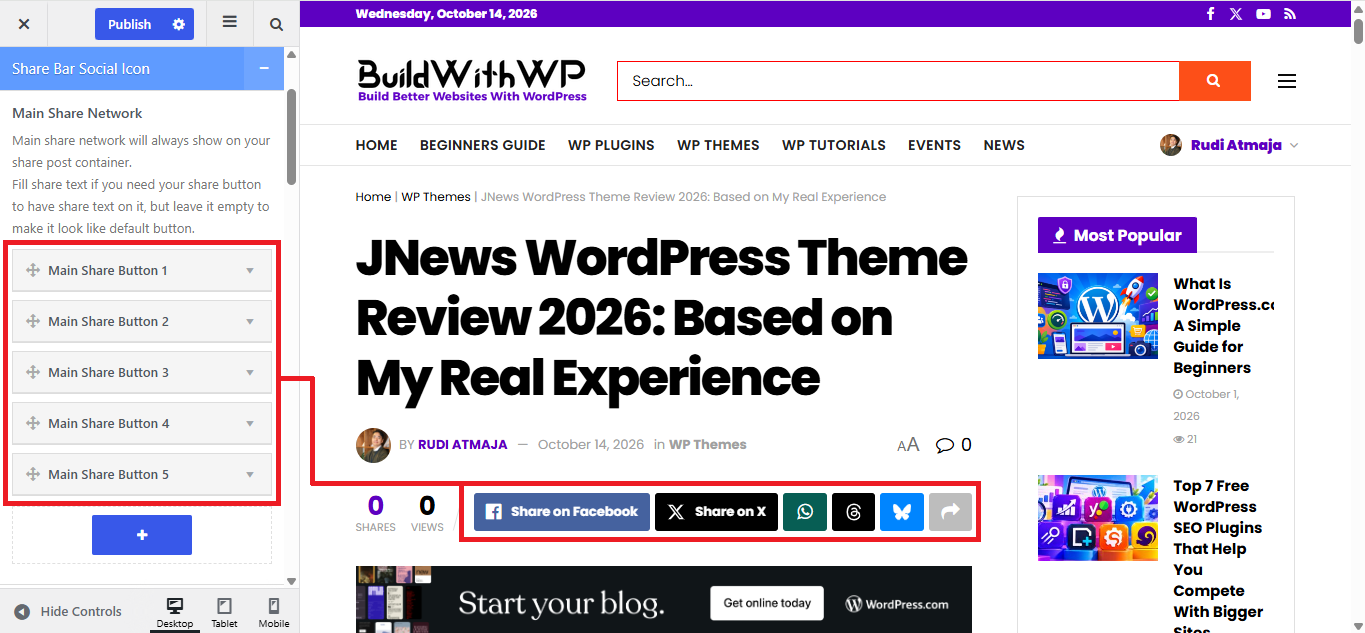
JNews provides several Social Sharing and Engagement Features. Its feature list includes social share buttons, a share bar with social counters, social profile buttons, and widgets for displaying social feeds. The theme also advertises a built-in like function, a configurable view counter, and social login and registration. These options cover different kinds of social interaction, from sharing an article with others to displaying social content and allowing visitors to use supported social accounts to access a website.
The theme’s social features also include Social Feed Widgets and Instagram Integration. JNews lists an Instagram feed widget that can be placed in the header or footer, along with a general social feed widget. These elements can display selected social content within the website’s layout, depending on the integration and configuration. Social platform APIs and policies can change, so individual integrations may require additional setup or may behave differently as services update their requirements.
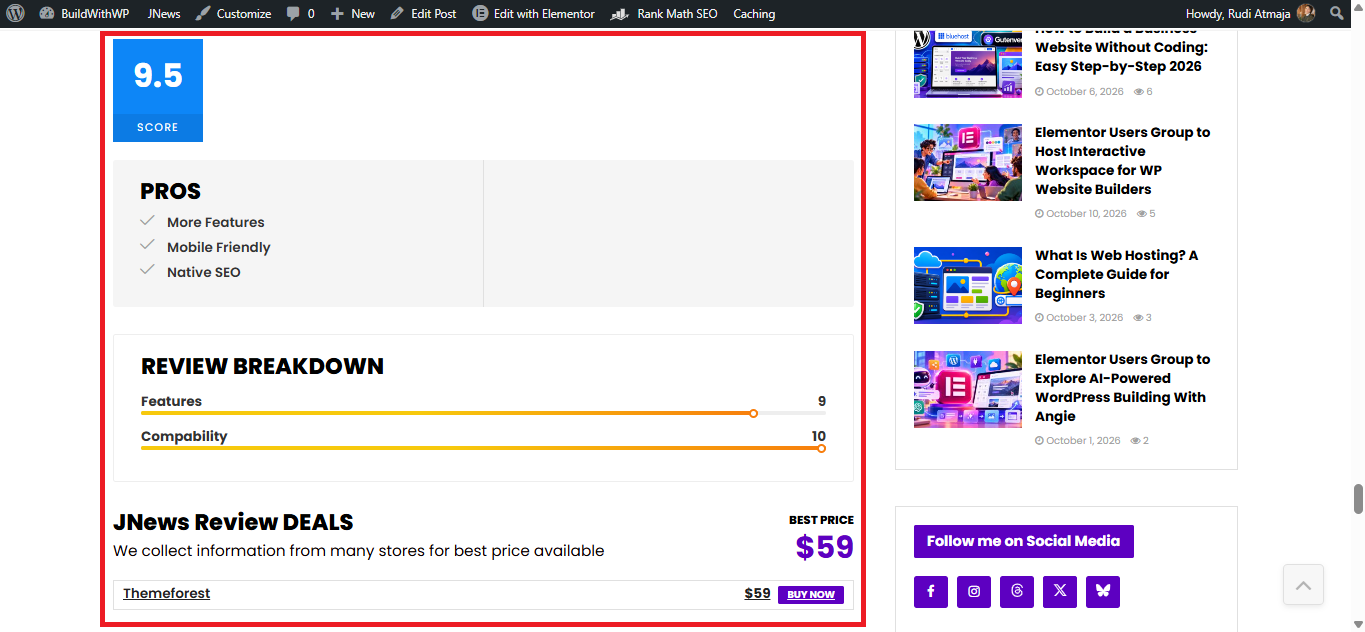
JNews includes a Review System with Three Review Types for websites that publish evaluations of products, services, or other items. A review layout can present evaluation information in a structured format rather than relying exclusively on paragraphs of text. This can be useful for publications that regularly compare products or publish ratings-based reviews. The precise display and available fields depend on the review format and the settings used for an individual post.
Another feature is Video Preview on Hover. This allows supported video content to preview when visitors hover over an appropriate video element, depending on the layout and configuration. The theme also supports video-format posts and provides dedicated video-oriented demos. These features are useful for publications that cover video content or want to build a website where videos are a central part of the browsing experience.
JNews extends its multimedia capabilities through JNews+ Video, an add-on offering a more specialized video website experience. Its promotional material describes features such as individual video pages, thumbnail previews, playlists for supported video services, video modules, and frontend video uploads. This feature set is intended for websites that need more than embedding occasional videos in regular articles. Availability depends on the relevant JNews+ component and its setup rather than the base theme alone.
The theme also supports an Audio Podcast System, with a dedicated JNews+ Podcast offering for podcast-focused websites. Its advertised capabilities include individual podcast pages, episode pages, and a built-in audio player. The promotional material also describes importing podcast content from supported services and displaying podcast-related content through dedicated layouts. This gives publishers a way to organize audio episodes as structured website content instead of treating each episode as an ordinary blog post.
For publishers who want to distribute content in a mobile-friendly visual format, JNews advertises Google Web Stories Support. Web Stories are designed as visually rich, tappable sequences that can combine images, video, and short text. The promotional material highlights customization options for the appearance of these stories, including multiple style choices. As with other integrations, the exact workflow and available controls depend on the associated plugin and the current support offered by the relevant platform.
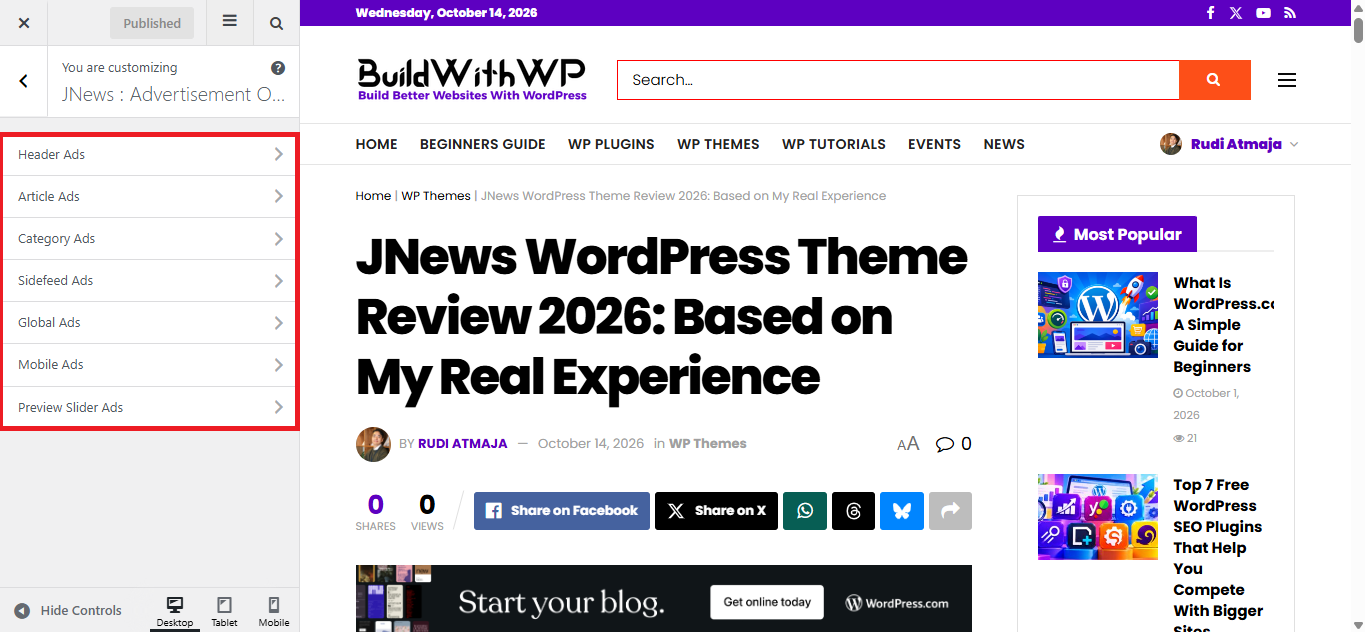
JNews also includes Advertising and AdSense Integration for websites that generate revenue through display advertising. The feature list covers responsive image and Google ads, page-level advertising formats, and placements that can be configured within the website. Its promotional materials describe more than 30 advertising positions and support for inline post ads and mobile advertising. The available placements can help publishers position advertisements in different parts of their pages, although actual ad delivery and revenue depend on the advertising service, account eligibility, and implementation.
Beyond standard display ads, JNews offers Affiliate Marketing and Referral Features. The theme lists affiliate and referral functionality through its review system, allowing publishers to incorporate referral links into relevant content. This can be useful for product reviews and buying guides that direct readers to external merchants. Affiliate programs still have their own approval rules, tracking requirements, and disclosure obligations, so those need to be handled separately from the theme’s layout and linking features.
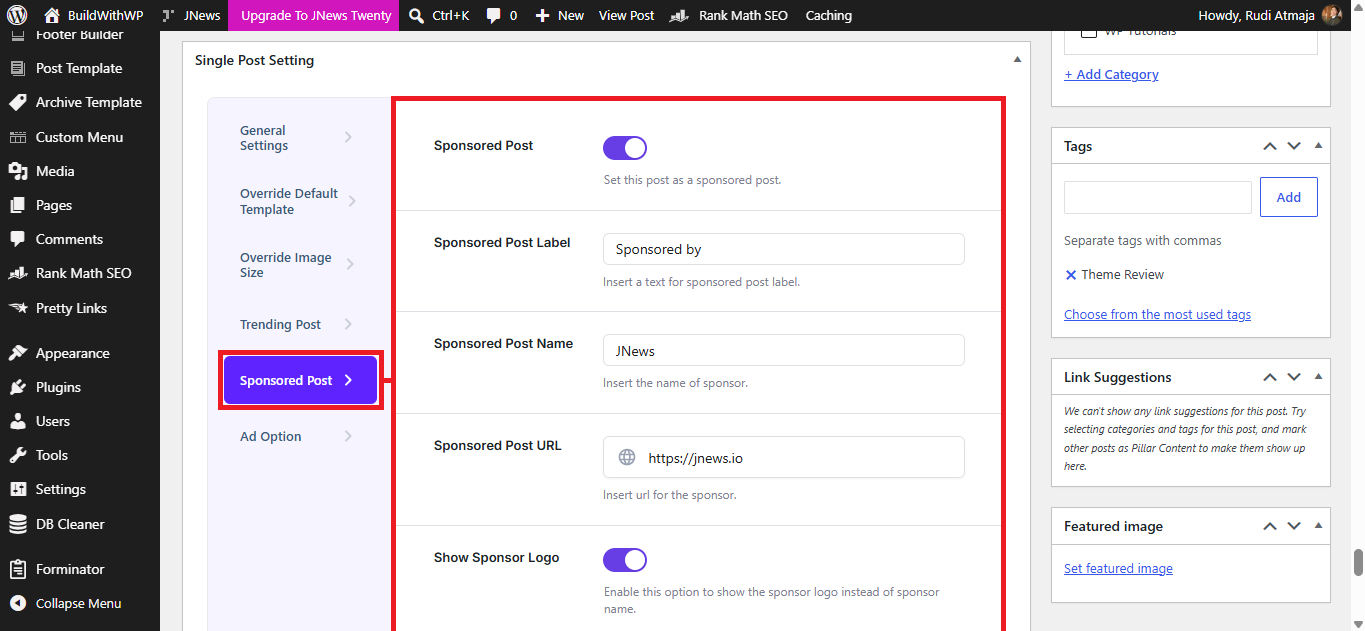
JNews supports Sponsored Posts and Paid Content Submissions for publishers that accept content from advertisers or contributors. Sponsored posts can provide a way to publish paid promotional material, while paid submission functionality can support a workflow in which contributors pay to submit content. The theme’s feature list also identifies frontend post submission, allowing users to submit content through the website rather than requiring direct access to the WordPress administration area. The exact workflow depends on the companion plugin and the submission settings configured by the site administrator.
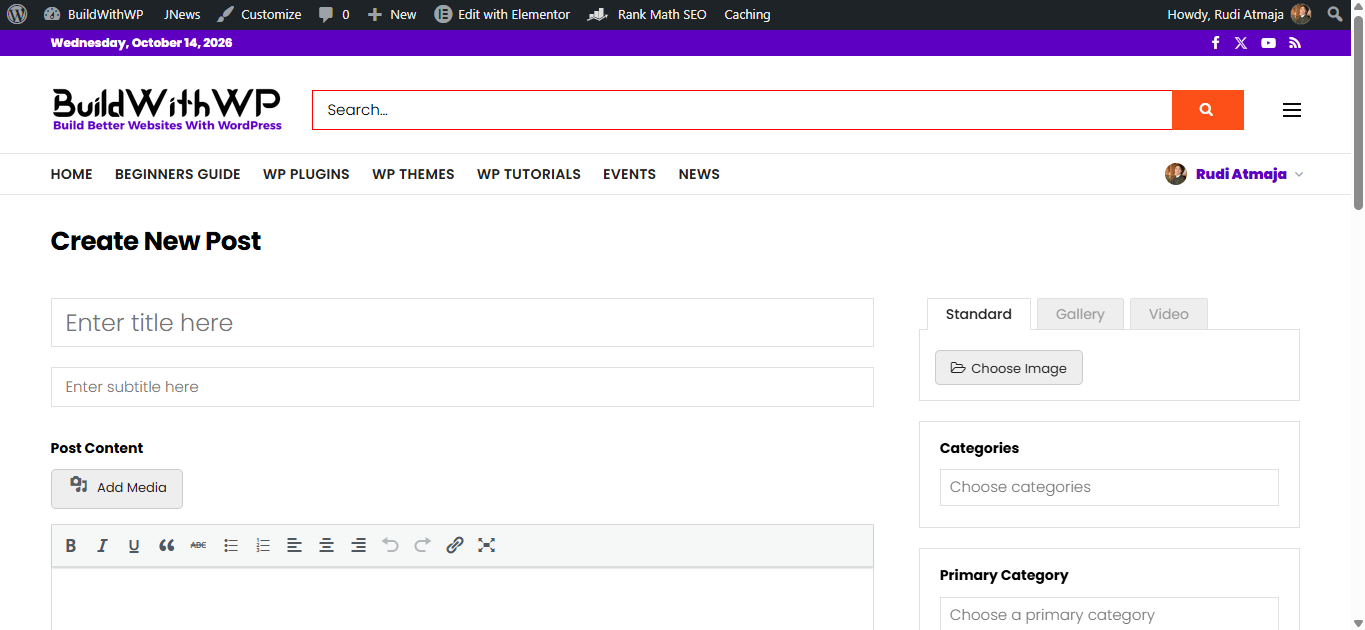
The Frontend Post Submission feature can be particularly relevant to websites that accept contributions from multiple writers. Instead of asking every contributor to use the WordPress dashboard, a site can provide a frontend submission interface for entering post details and content. The advertised feature set includes options related to submitted content, and a 2026 update also added a JNews Gallery option to frontend submission. User roles, moderation, required fields, and publishing permissions still need to be configured appropriately for the website.
For websites that publish premium material, JNews offers a Paywall System and Content Locker. These features are intended to restrict access to selected content, allowing a publisher to place some material behind an access requirement. The promotional materials describe options for showing a preview while limiting access to the full article. This type of setup can support a paid-content strategy, but the access rules, payment configuration, and user experience depend on the relevant paywall tools and their settings.
JNews also has Content Subscriptions, Memberships, and Recurring Payments. These features can support websites that charge visitors for access over a defined period or provide membership-based access to selected content. The promotional material describes subscription options alongside the ability to charge for individual posts. These are separate monetization approaches: a subscription can provide ongoing access under a plan, while a pay-per-post model can charge for a particular item. Payment gateways, subscription rules, and any required companion components must be configured for the intended model.
Another specialized offering is JNews+ Paywall, which is promoted for restricting premium content and offering subscription or article-purchase options. Its materials describe content restrictions, flexible pricing, and support for WooCommerce Subscriptions. This provides an option for publishers who want to build a more structured paid-content system around their articles. The available payment methods and subscription behavior depend on the relevant components and configuration, so this should be treated as an additional setup rather than an automatic result of installing the theme.
JNews also has JNews+ Pay Writer, a feature set designed for websites that compensate contributors. Its promotional material describes donation buttons, post statistics, payment criteria, and PayPal integration. These tools are intended to help publishers track contributor performance and establish payment workflows related to submitted content. They serve a different purpose from paywalls and subscriptions because the focus is on managing payments to writers rather than charging readers for access. <Cite refs={[“turn471905view0”]}/>
For community-oriented publications, JNews has bbPress Forum Integration. bbPress is a WordPress forum plugin that can be used to create discussion areas where members start topics and reply to posts. The integration makes it possible to build a website that combines editorial content with community discussions, depending on the forum configuration and theme styling. Forum permissions, moderation, and member management still need to be set up for the specific community.
JNews also supports WooCommerce and Shopping Cart Features. WooCommerce can be used to add product pages, cart functionality, checkout, and other online-store capabilities to a WordPress website. This extends the potential use of JNews beyond editorial publishing into websites that combine articles with product sales. The theme provides compatibility and presentation features, while store operations such as product management, payment methods, shipping, and tax settings are handled through WooCommerce and its extensions.
For websites with several contributors, JNews supports Multiple Authors per Post. This allows a single article to be associated with more than one author, which can be useful for collaborative reporting, interviews, or content created by a team. Author information can be an important part of editorial presentation, especially for publications that need to credit multiple contributors. The way authors are displayed depends on the article template and the relevant settings.
JNews includes Dark Mode Switching with an automatic-switching option advertised in its promotional material. A dark appearance can change the visual presentation of supported website elements, offering an alternative to the standard light interface. The automatic-switching option is intended to help align the appearance with a reader’s preferred or configured mode, depending on how the feature is implemented. The result should still be checked across the site’s templates to ensure that text, images, controls, and other elements remain legible.
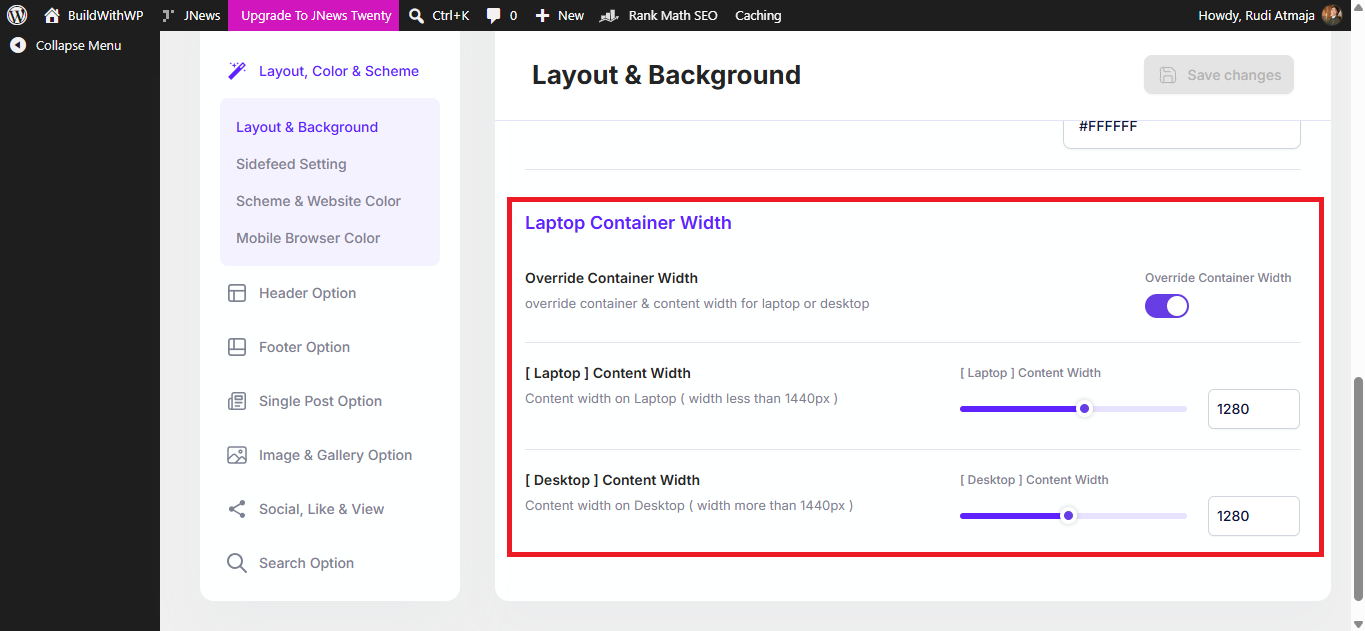
The theme’s Custom Website Width and Layout Options allow you to adjust the overall content area and choose among supported layout styles. JNews lists boxed layouts and custom website width among its features, providing control over how much horizontal space the site occupies. These options can influence the balance between the main content column, sidebars, and surrounding background. The resulting layout should be tested at different screen widths because a setting that works on a large desktop display may not be ideal on a mobile device.
JNews also provides Custom Galleries with Advertisement Support. Its feature list describes a gallery option that can display advertising alongside gallery content and show image descriptions in a fullscreen presentation. This is relevant to image-heavy publications, such as photography websites, travel magazines, and visual news sites. The gallery can give images a more prominent presentation while also providing a way to incorporate advertising into that content format.
For websites that want to encourage visitors to subscribe to a mailing list, JNews includes Email Subscriber Integration. The feature list describes subscriber functionality through a widget and a WPBakery Page Builder block. This can provide a place to collect newsletter sign-ups within the website’s layout, depending on the supported integration and configuration. Email delivery, subscriber management, consent requirements, and campaign sending may still rely on a connected email service or additional plugin.
JNews also has Subscribe to Download, which can be used to place a subscription requirement before a visitor downloads selected material. This can be useful for websites offering downloadable guides, templates, or other resources in exchange for a newsletter sign-up or subscription action. The exact requirement and delivery process depend on how the feature is configured and which supporting tools are used. It should be distinguished from a paid-content paywall, since the intended action may be subscribing to a mailing list rather than purchasing access.
Another feature is Website Push Notifications. Push notifications can be used to notify subscribers about new content or other website updates through a supported notification service. This offers publishers an additional communication channel beyond email and social media. However, notification delivery typically depends on an appropriate service, visitor permission, and the configuration of the related integration rather than the theme’s visual design alone.
JNews provides SEO-Oriented Technical Features, including JSON-LD structured data, image alt-text fallback, responsive layouts, and support for SSL and HTTPS. Structured data helps describe page content in a format search engines can process, while alt text can provide a text alternative for images when properly configured. The theme also lists compatibility with Google AMP and other publishing-related features. These tools can support a site’s technical setup, but they do not guarantee better rankings or rich results, which depend on content quality, implementation, and search engine decisions.
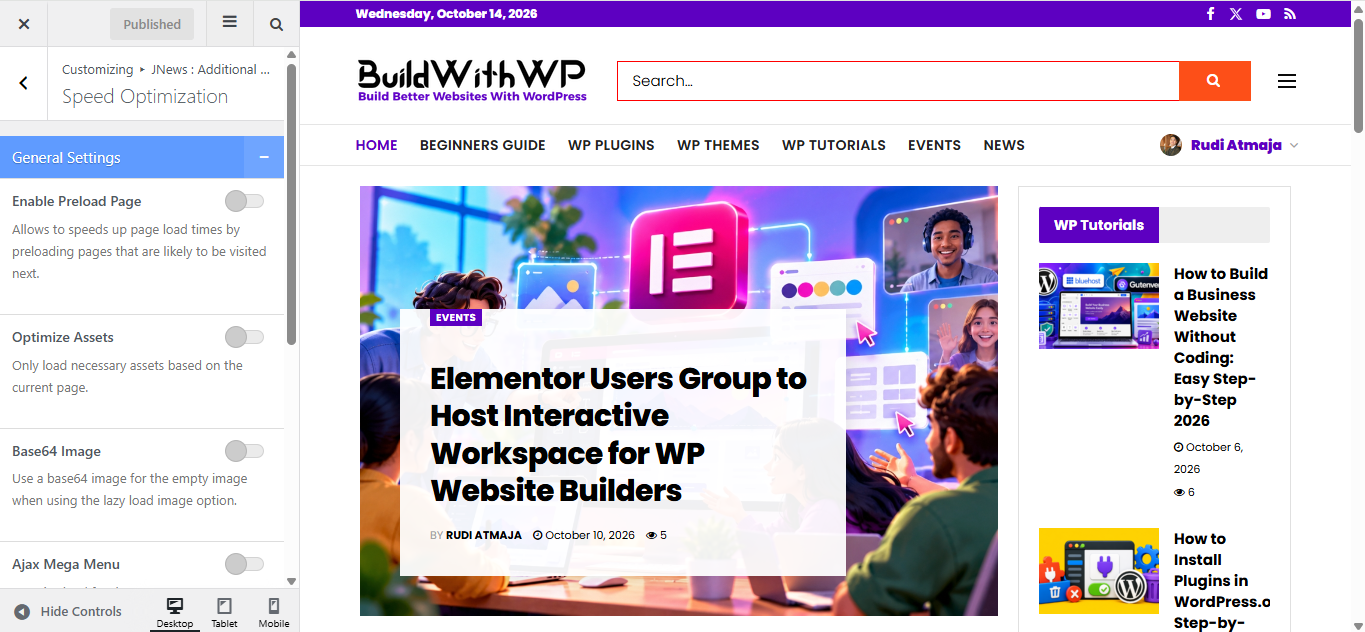
For performance, JNews advertises Minified CSS and JavaScript, Lazy-Loaded Images, and Optimized Database Queries. Minification reduces unnecessary characters in code files, while lazy loading can defer loading certain images until they are needed. The theme also describes lightweight code and compatibility with caching plugins such as Autoptimize and WP Super Cache. These features are intended to help performance, but the speed of a finished website also depends on hosting, image sizes, plugins, external scripts, caching configuration, and the content displayed on each page.
JNews includes Multilingual and Right-to-Left Language Support. The product listing identifies compatibility with WPML and Polylang for multilingual websites and says RTL support is available for JNews components. These options can help publishers create websites in multiple languages or support languages written from right to left, such as Arabic and Hebrew. Translation setup, language-specific content, and the behavior of third-party plugins still need to be managed as part of the overall site configuration.
The theme also offers Translation Tools and Video Documentation to support configuration and localization. Its feature list describes a translation tool and access to video documentation from the WordPress backend. These resources can help site administrators understand the available settings and adapt interface strings to their needs. The documentation and translation workflow are particularly relevant when setting up a theme with many features and multiple supported integrations.
2. JNews Design Flexibility
A publishing website needs more than a collection of attractive pages. Its design also needs to establish a clear visual hierarchy, helping readers distinguish the main story from supporting articles, navigate between sections, and read content comfortably. JNews provides a range of design elements that can be combined to create different visual identities, from image-heavy magazine layouts to more restrained editorial websites.
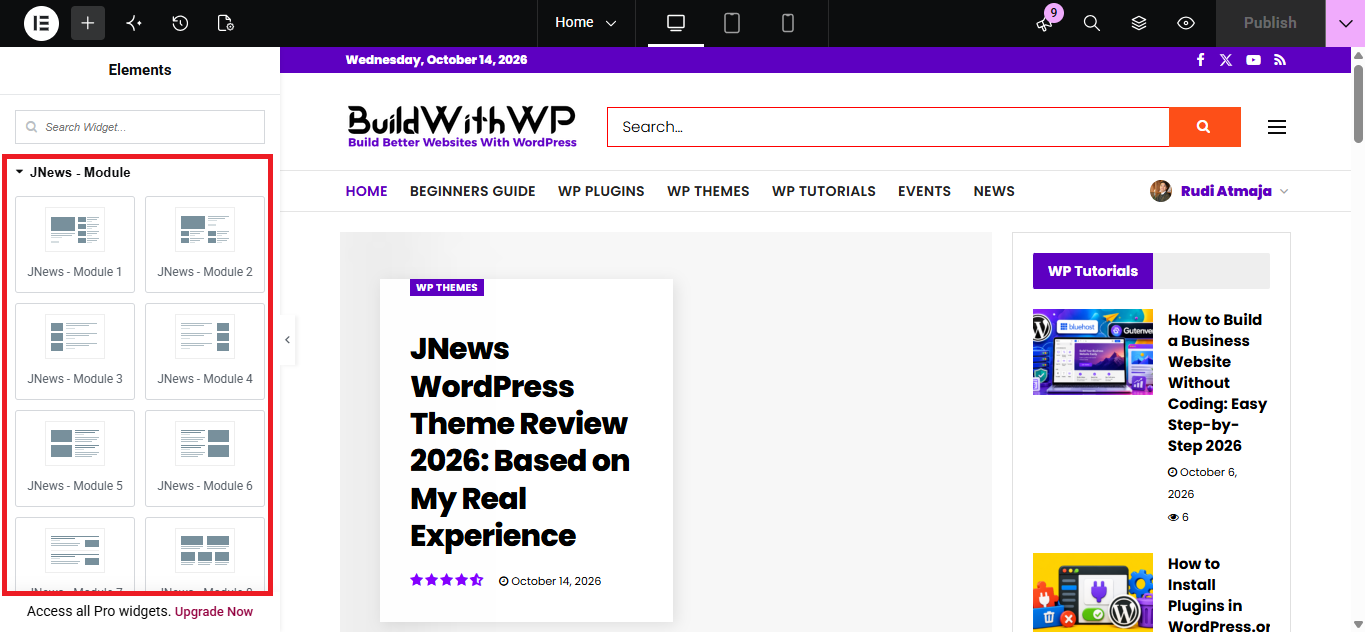
One detail worth exploring is the variety of content presentation styles available within the theme. JNews provides different post modules for displaying articles in grids, lists, carousels, and featured formats. These variations give you room to change the visual rhythm of a page instead of presenting every group of articles in the same way. A featured story can receive more visual emphasis, while supporting articles can appear in a denser arrangement that allows readers to scan several headlines at once.
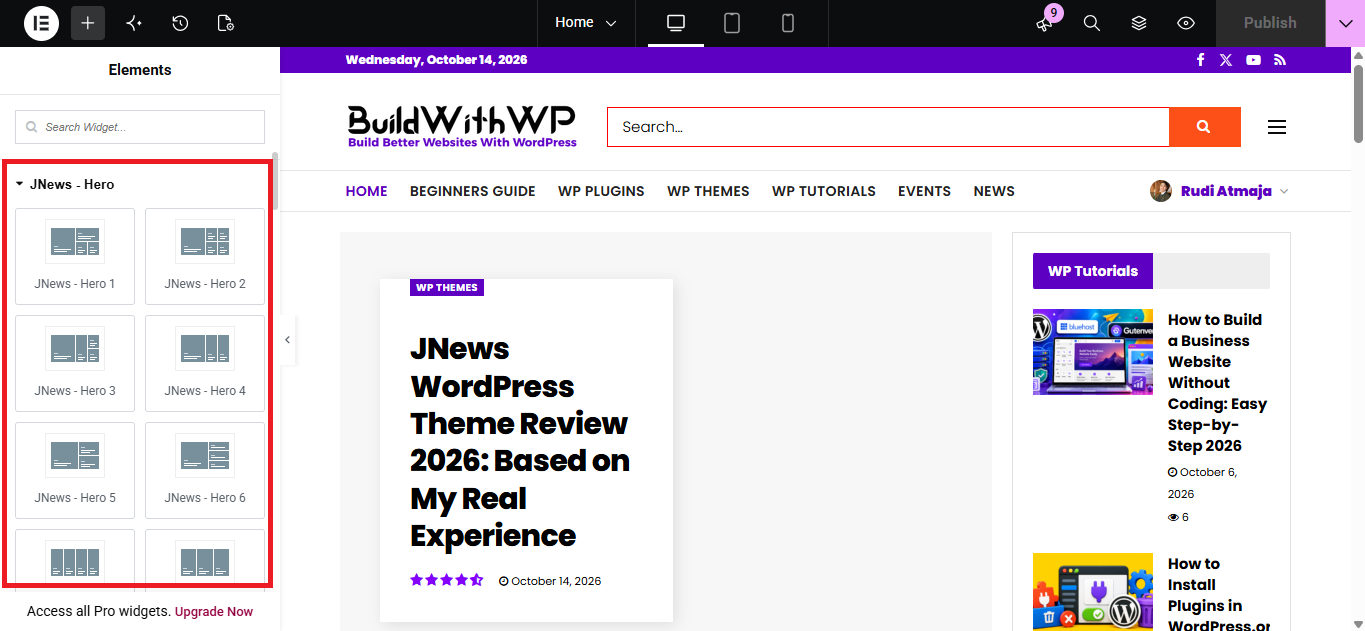
The available hero designs offer another way to shape the first impression of a page. JNews lists multiple hero section styles for highlighting featured stories, breaking news, or trending content. The choice of hero layout influences how prominently images and headlines appear before readers reach the rest of the page. This is particularly relevant for publications where the lead story changes frequently and needs to stand out without making the entire homepage feel visually repetitive.
Sliders and carousels provide additional options for presenting selected content in a limited amount of space. JNews includes several slider styles, with settings for aspects such as image dimensions, autoplay speed, and navigation. Carousels can also be used to display groups of related or featured posts in a horizontally browsable format. These elements can add variety to a page, although their placement should serve a clear editorial purpose rather than simply adding movement to the design.
JNews also offers a frontend styling option through its integration with YellowPencil. This tool allows supported visual properties, including fonts, colors, and spacing, to be adjusted directly on the website’s frontend. Rather than locating every styling option in a separate settings panel, you can work with the visible element and review the effect of your changes as you make them. For more specific visual adjustments, this provides another route beyond the theme’s standard customization controls.
3. JNews Documentation and Customer Support
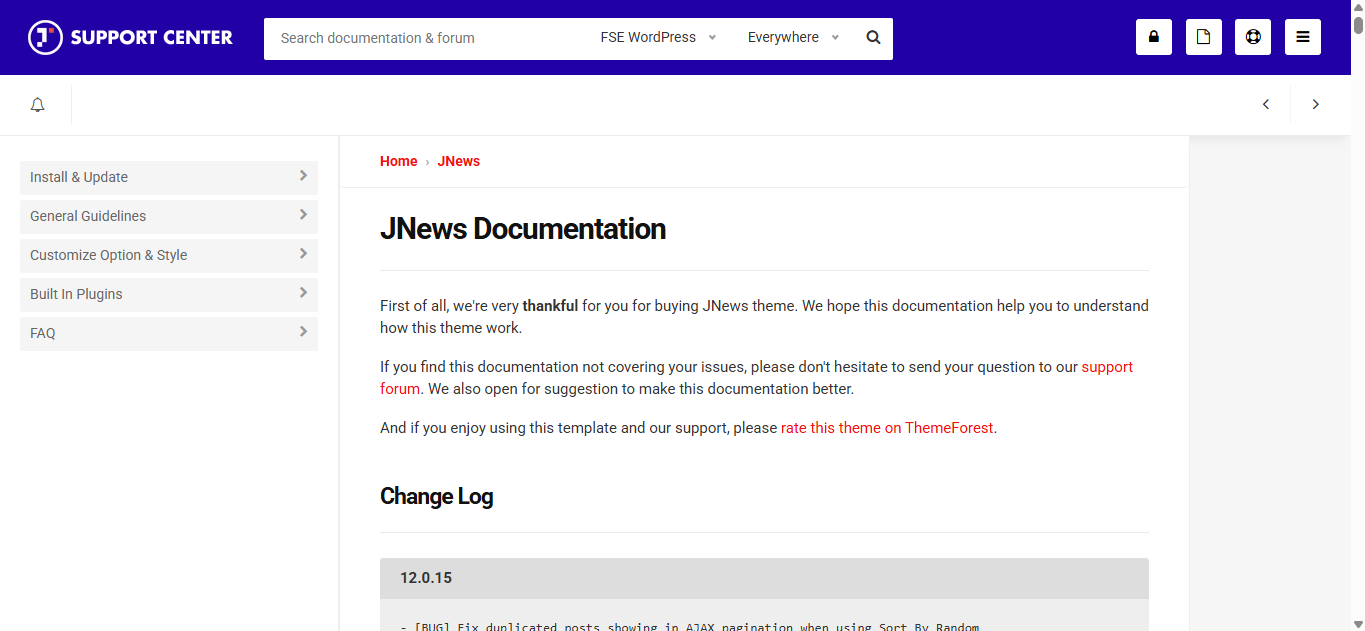
Using a premium WordPress theme can involve a learning curve, especially when you are setting up a publishing website with several content sections and specialized requirements. When something does not work as expected, clear documentation and accessible technical support can make a significant difference. JNews provides a dedicated documentation website covering installation, configuration, and troubleshooting, along with a support forum where customers can seek help with issues that are not covered by the available guides.
The documentation is particularly useful during the initial installation process. For example, the official installation guide explains that the downloadable package may contain several files, while WordPress requires the installable theme ZIP. Uploading the entire package instead of the correct theme file can trigger the familiar “The package is missing the style.css stylesheet” error. Knowing where to find these instructions can save time when setting up JNews for the first time.
Server configuration is another area where the documentation can help. JNews specifies requirements involving PHP, memory limits, upload sizes, execution time, and other server settings. Its support guide also addresses potential obstacles during demo imports, including file permissions and configurations that can interfere with requests to the theme’s servers. These details are useful when an installation or import problem originates from the hosting environment rather than the theme’s visual settings.
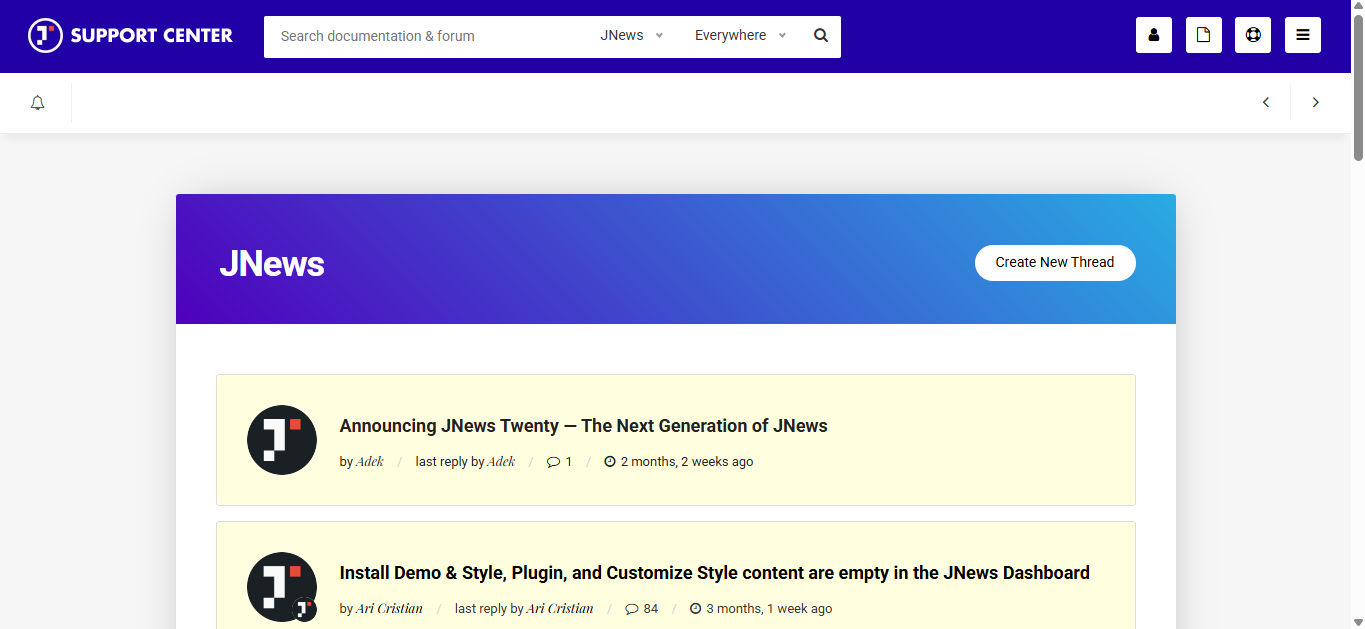
For problems that require more specific assistance, JNews directs customers to its support forum. Before submitting a request, it is helpful to identify the affected page, describe the steps that reproduce the issue, and provide relevant error messages or screenshots. This gives the support team more concrete information to investigate than a general report that something is not working. The actual resolution time and level of assistance may vary depending on the problem and the information provided.
JNews also maintains a changelog documenting fixes, improvements, and updates to its theme and associated plugins. Reviewing these records can help you determine whether an issue has already been addressed in a newer release. The documentation currently lists version 12.0.15, including a fix for duplicated posts in AJAX pagination under a specific sorting configuration and an update to WPBakery Page Builder. Checking the relevant release notes before troubleshooting can help distinguish an existing bug from a configuration problem.
4. What I Like About JNews
What I appreciate about JNews is that it is built with content publishing in mind. Running BuildWithWP involves more than simply putting an article online. I need to organize content, maintain a consistent presentation, and make sure the website continues to work as I add more posts. A theme designed around publishing gives me a more relevant starting point for this kind of workflow than one primarily intended for a general business website.
I also like that JNews is aimed at websites where articles are the main focus. For a blog like BuildWithWP, the content needs to remain at the center of the experience. The theme is designed for publishing-oriented websites, which makes its overall approach relevant to a site that regularly covers WordPress, website building, themes, and plugins.
Another aspect I appreciate is having a theme that can accommodate a growing content library. As BuildWithWP expands, the website needs to support more articles without losing its identity as a publication. Choosing a theme developed specifically for blogs and magazine-style websites provides a foundation that can continue to serve that purpose as the amount of content grows.
Ultimately, what I value most in a WordPress theme is how well it fits the actual purpose of my website. A theme can offer an extensive collection of options, but those options matter most when they support the way I publish and manage content. For BuildWithWP, JNews is worth evaluating in that practical context rather than judging it solely by the number of features listed in its product description.
5. What I Don’t Like About JNews
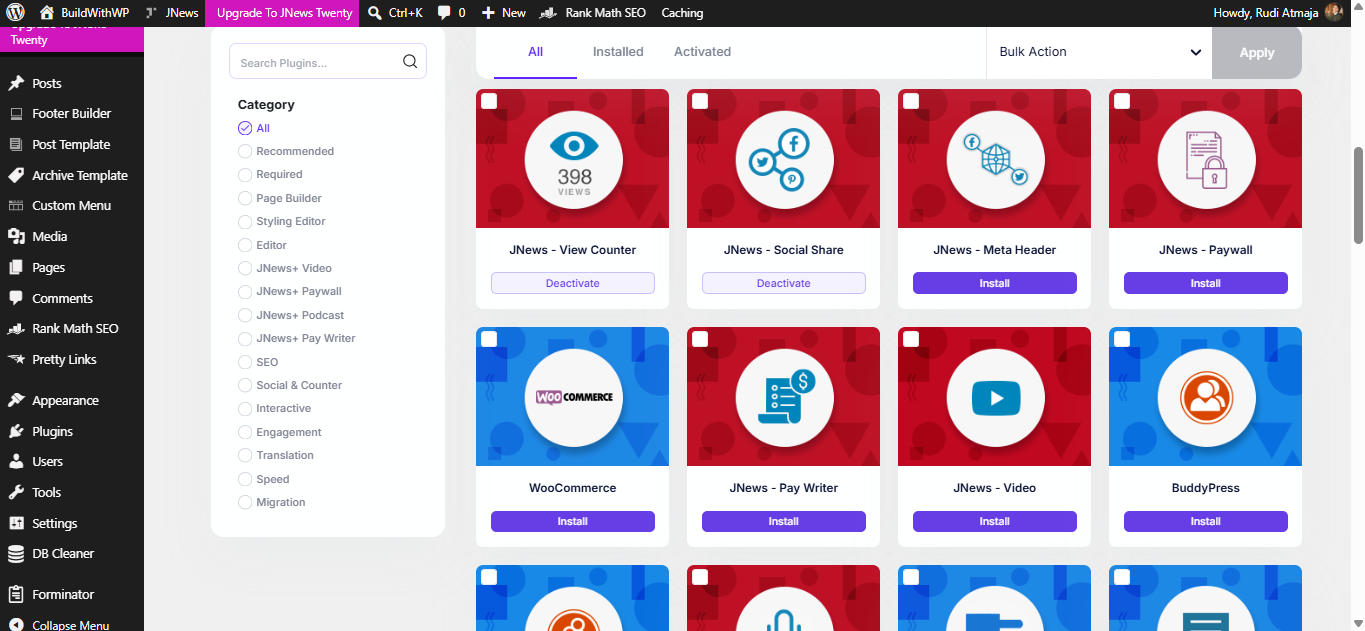
One thing I don’t particularly like about JNews is how some of its additional features rely on separate plugins. While this approach allows you to install only the extensions you need, I personally prefer a modular system where individual features can be enabled or disabled directly within the theme, without requiring separate plugin installations for every additional capability.
My main reason is simplicity. When a feature is integrated into a modular system, I can manage the functionality I need from one place instead of having to install, activate, configure, and maintain multiple plugins. This would make the overall setup feel more unified, especially for website owners who want to keep their WordPress dashboard organized and avoid dealing with too many separate settings pages.
I also prefer the flexibility that a well-designed modular system can offer. Ideally, each module would load only when enabled, so I could keep unnecessary functionality turned off without adding more active plugins to the website. Of course, this depends on how the theme is developed. A modular system is not automatically faster or more efficient than a plugin-based approach, but when implemented properly, it can provide a cleaner way to manage optional features.
Another consideration is maintenance. Every additional plugin can introduce its own update schedule, compatibility requirements, settings, and potential conflicts with other components. Managing several extensions is not necessarily a problem, but it does add another layer of responsibility. I would prefer a more centralized approach that makes it easier to see which optional features are active and manage them without jumping between multiple plugin interfaces.
That said, I understand why JNews uses separate plugins for certain capabilities. Keeping additional functionality in individual plugins can help isolate features, make them easier to update independently, and prevent every installation from needing the same collection of tools. My preference for a modular system is therefore not a claim that JNews’s approach is inherently wrong. It simply reflects how I would prefer to manage optional functionality on my own website, with fewer separate installations and a more centralized configuration experience.
Wrap It Up
JNews is a WordPress theme built for publishers, bloggers, and website owners who want a content-focused website with plenty of built-in capabilities. It offers a broad range of tools for managing and presenting articles, monetizing content, and adapting a website to different publishing needs. However, whether it is the right choice depends on your goals, preferred workflow, and how much functionality you actually need.
From my experience using JNews for BuildWithWP, I believe choosing a theme should involve more than looking at its feature list. The way you manage its functionality matters, too. For example, I would prefer a modular system over installing separate plugins for additional features because I value having a more centralized and straightforward way to manage optional functionality. This is a personal preference, and other website owners may find JNews’s plugin-based approach more suitable for their needs.
Ultimately, JNews is worth considering if you are building a blog, online magazine, or other publishing-focused website and want a theme with extensive capabilities. Before committing, consider its customization workflow, additional plugin requirements, maintenance needs, and compatibility with your existing setup. The best theme is not necessarily the one with the most features, but the one that fits the way you want to build, manage, and grow your website.
The Review
JNews – WordPress Newspaper Magazine Blog SEO Theme
JNews is a feature-rich WordPress theme for blogs, online magazines, and news websites. It offers extensive publishing capabilities and customization options, although its reliance on separate plugins for certain features may not suit everyone.
PROS
- Extensive features for news websites, online magazines, and blogs.
- Multiple homepage demos and ready-made publishing layouts.
- Flexible customization options for different website styles.
- Supports popular page builders, including Elementor and WPBakery.
- Includes monetization options for advertising, affiliate marketing, and paid content.
- Offers specialized extensions for video, podcasts, paywalls, and other publishing needs.
- - Provides documentation, technical support, and regular theme updates.
CONS
- Some additional features require separate plugin installations.
- The extensive settings may take time to learn and configure.
- Managing multiple companion plugins adds maintenance work.
- Some advanced features may be unnecessary for simpler blogs.
- Actual website performance depends on hosting, plugins, content, and configuration.